The Firebox T185 is the most powerful tabletop firewall in the Firebox T Series designed to handle heavier traffic loads in demanding environments.
The Firebox T185 includes these features:
- 4 x 1 GbE RJ45 Ethernet ports
- 4 x 2.5 GbE RJ45 Ethernet ports with two ports that support PoE+ (802.3at) output
- 1 x SFP+ port that supports 10 Gbps/1 Gbps with compatible SFP+/SFP transceivers
- Built-in power supply
- Kensington lock slot for physical security
Firebox Management in WatchGuard Cloud
You can locally-manage your Firebox with Fireware Web UI or WatchGuard System Manager (WSM), or you can manage your Firebox in WatchGuard Cloud.
WatchGuard Cloud enables you to monitor and configure your WatchGuard products in one place. You can set up your devices and configure and manage security and networking policies across multiple Fireboxes with flexible templates. For Service Providers, a multi-tier architecture makes it easy to manage inventory across your accounts.
- Go to Quick Start — Set Up a New Firebox for information on how to set up your new Firebox.
- If you want to manage your Firebox in WatchGuard Cloud, select Cloud-Managed as the configuration method in the Web Setup Wizard.
- If you want to locally-manage your Firebox, select Locally-Managed as the configuration method in the Web Setup Wizard.
- You can also set up your Firebox directly in WatchGuard Cloud as a new cloud-managed device. When you connect your Firebox to the network and start your new device with factory-default settings, the Firebox automatically connects to WatchGuard Cloud and gets the device configuration. For more information, go to Add a Cloud-Managed Firebox to WatchGuard Cloud.
Fireware
The Firebox runs WatchGuard’s next generation UTM operating system—Fireware. Fireware delivers exceptional protection against today's sophisticated threats to make sure that your business stays connected. For more information on the features of Fireware, go to Firebox Feature Comparison — Locally-Managed and Cloud-Managed.
Upgrade Your Firebox
For the best security and the latest features, make sure you upgrade your Firebox to the latest available version of Fireware. To upgrade Fireware, use one of these methods:
- To upgrade a Firebox managed in WatchGuard Cloud, select your Firebox and click Upgrade to firmware <version>. For more information, go to Manage Firmware Versions for Devices in WatchGuard Cloud.
- To upgrade a locally-managed Firebox, in Fireware Web UI, select System > Upgrade OS. For more information, go to Upgrade Fireware or WatchGuard System Manager.
Package Contents
- Firebox device
- 1 x RJ45 Ethernet cable (Cat5e)
- 4 x rubber feet
To help reduce environmental waste, WatchGuard does not include a power cord with the Firebox T185. WatchGuard offers regional power cords sold separately for your device. For more information about power cord specifications, go to the Power Input hardware description section of this guide.
About Your Hardware
Hardware Specifications
| Component | Specification |
|---|---|
| Processor |
Intel Quad-Core x7405C at 2.2 GHz |
| Memory | 4 GB DDR4 (2 GB x 2) |
| Flash Memory | AT24C02D-SSHM-T (2K bits) |
| Storage | 16 GB eMMC |
| Network Interfaces | 4 x 1 GbE RJ45 4 x 2.5 GbE RJ45 1 x 10 GbE SFP+/SFP (Supported Transceivers) |
| I/O Interfaces | 2 x USB-A 3.2 1 RJ45 Serial Port |
| Power Supply (Internal) | Output Ratings: 12 V at 2.5 A 30 W 54 V at 1.67 A, 90 W (PoE) |
| PoE/PSE Output | 2 x 2.5 GbE ports that support PoE+ (802.3at) power 30 W/port |
| Power Consumption | 25 W (no PoE), 90 W (with PoE) maximum |
| Dimensions | D = 330 mm (13"), W = 212 mm (8.35"), H = 44mm (1.73") |
| Weight | 2.43kg (5.33lbs) |
| Operating Temperature and Humidity |
0° to 40° C (32° to 104° F) 0% to 95% non-condensing |
| Non-Operating Temperature and Humidity |
-25° to 75° C (-13° to 167° F) |
| Mean Time Between Failures (MTBF) | 172,411 hours |
TPM (Trusted Platform Module)
This hardware contains a TPM chip for use with secure WatchGuard Cloud registration of the device.
Environmental Requirements
To safely install your Firebox, we recommend that you:
- Install the Firebox indoors.
- Deploy the Firebox in a secure area, such as a locked room, to block the device from people who do not have permission to use it.
- Connect the Firebox to a conditioned power supply to prevent damage from sudden power changes.
- Do not place other devices directly on the Firebox if you have installed the Firebox in a rack.
Hardware Description
Front View
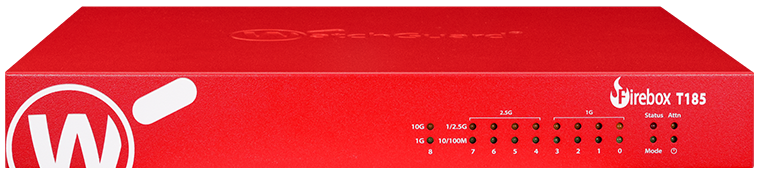
Status
The Status indicator is red when there is a management connection to the device. The Status indicator is lit for 30 seconds after you connect to the device with Fireware Web UI or the command line interface. It is also lit when the device is polled by WatchGuard System Manager.
Mode
The Mode indicator shows the status of the external network connection. The indicator is green if the device can connect to the external network and send traffic. The indicator flashes if the device cannot send traffic to the external network.
Attn
The Attn indicator is yellow when you start the device with the Reset button pressed. For more information, go to Restore Factory-Default Settings.
Power ( )
)
The Power indicator is lit to indicate power status. The indicator is green when the Firebox is powered on.
Network Interface Status Indicators
The Firebox T185 has nine network interfaces. There are two status indicators for each interface on the front of the device. The indicator flashes to indicate network activity. The flashing speed increases as the data sent or received increases.
Interfaces 0 to 3 (1G Interfaces)

- Yellow (upper) — 1000 Mbps
- Green (lower) — 100 Mbps or 10 Mbps
Interfaces 4 to 7 (2.5G Interfaces)
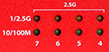
- Yellow (upper) — 2.5 Gbps or 1000 Mbps
- Green (lower) — 100 Mbps or 10 Mbps
Interface 8 (10G SFP+ Interface)

- Yellow (upper) — 10 Gbps
- Green (lower) — 1 Gbps
Rear View
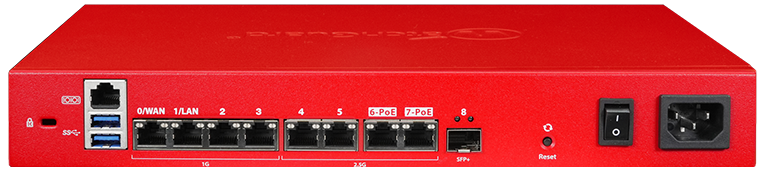
Kensington Lock Slot
A Kensington security lock slot is available for use with a security cable to secure your device.
Serial Port ( )
)
The RJ45 serial console port enables serial connections to the device. An RJ45 serial cable is not included. For information on how to connect to the Fireware command line interface with the serial port, go to the Fireware CLI Reference Guide available from the WatchGuard Product Documentation web site.
USB Interfaces ( )
)
The device has two USB 3.0 Type-A interfaces. You can connect a USB storage device for USB backup and restore or to store a support snapshot. For more information, go to Use a USB Drive for System Backup and Restore.
Network Interfaces
The Ethernet interfaces have standard RJ45 connectors. The first two interfaces are labeled 0/WAN and 1/LAN.
- Interfaces 0 to 3 support 10/100/1000 Mbps
- Interfaces 4 to 5 support 2.5 Gbps and 10/100/1000 Mbps
- Interfaces 6-PoE and 7-PoE (Power over Ethernet) support 2.5 Gbps and 10/100/1000 Mbps and are compliant with the 802.3at (PoE+) output standard. You can use these ports to power WatchGuard access points or other small devices.
If you use both 6-PoE and 7-PoE interface ports at the same time, the combined maximum throughput is approximately 4 Gbps due to bandwidth limitations on the shared uplink to the CPU.
- Interface 8 SFP+ supports 10 Gbps and 1 Gbps with compatible SFP+/SFP transceivers. For a list of supported transceivers, go to Supported SFP+/SFP transceivers for Firebox devices.
Left indicator (Activity) — The left LED indicator on the interface port flashes yellow to indicate network activity. The flashing speed increases as the data sent or received increases.
Right indicator (Connection) — The right LED indicator on the interface port indicates the connection status:
1G Interfaces
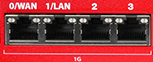
- Yellow — 1000 Mbps
- Green — 100 Mbps
- Not lit — 10 Mbps or no link
2.5G Interfaces
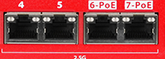
- Yellow — 2.5 Gbps
- Green — 1000 or 100 Mbps
- Not lit — No link
SFP+/SFP Interface

- Yellow — 10 Gbps
- Green — 1 Gbps
- Not lit — No link
Reset Button
This button resets the device. To restore the device to factory-default settings, go to Restore Factory-Default Settings.
Power Switch
Use the power switch to control the power supplied to the device.
To allow adequate time for the power to discharge, wait at least five seconds after you power off the device before you power it on again to restart the device.
The Firebox T185 model has an internal power supply with a standard power input receptacle for use with an IEC C13 AC power cord (not included). We recommend you use a minimum 18AWG/10A power cable.
WatchGuard offers these regional power cords sold separately for your device:
- WG9033 (US)
- WG9034 (EU)
- WG9035 (UK)
- WG9036 (AU)
- WG9038 (BR)
- WG9039 (JP)
- WG9040 (CH)
Cooling Fan
The Firebox has a fan that decreases the internal temperature of the device. The device adjusts the fan speed based on the temperature.
You can view the current fan speed from the Fireware CLI with the command diagnose hardware system. For more information on how to use the CLI, go to the Fireware Command Line Reference Guide.
Temperature RPM (Approximate) Less than 73° C 3,520 RPM 74° to 88° C 10,000 RPM Higher than 89° C 10,000 RPM
Rack Mount Installation
An optional rack mount kit (WG9041) with ear brackets is available for the Firebox T185 that enables you to install the device in a network rack.
The rack mount kit includes:
- 2 ear brackets
- 6 small screws
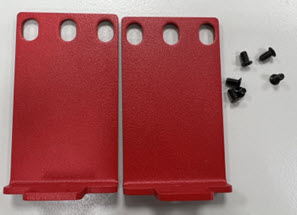
To install the Firebox in a rack:
- Use the included screws to attach the ear brackets to each side of the Firebox before you install the device in the rack.
You can install the ear brackets on the front or the rear of the Firebox depending on which side you want to access from the front of the rack.
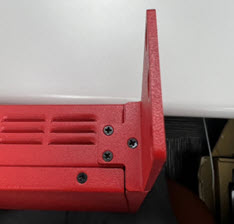
- Position the Firebox in the network rack so that the holes in the brackets align with the holes in the front of the rack.
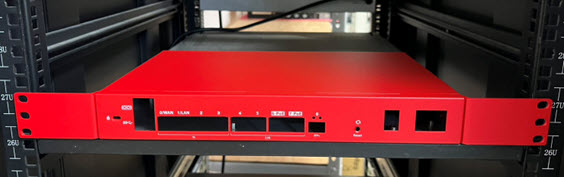
- Use rack screws (not included) to securely attach the brackets to the front of the rack.
Precautions
WARNING: Do not place other devices directly on the Firebox, or use the Firebox as a shelf or work space.
When you install the device in a rack, make sure you consider these factors:
Elevated Operating Ambient Temperature
If you install the device in a closed or multi-unit rack assembly, the operating ambient temperature of the rack environment might be greater than room ambient. Make sure the ambient temperature of the rack environment is within the certified operating range specified in this Hardware Guide.
Reduced Air Flow
When you install the device in a rack, make sure that the amount of air flow required for safe operation of the equipment is not compromised.
Mechanical Loading
When you mount the device in the rack, avoid hazardous conditions caused by uneven mechanical loading.
Circuit Overloading
Make sure you connect the device to the power supply circuit in such a way that there is no overloading of the circuits, and no impact on overcurrent protection and supply wiring.
Reliable Grounding
Make sure all rack-mounted equipment is correctly grounded. For example, make sure you use power strips instead of direct connections to the branch circuit.
Restore Factory-Default Settings
If you have a problem in your configuration file that you cannot correct, or you cannot access the device, you can restore the device to factory-default settings and start with a new configuration. For example, if you do not know the administrator account passphrase, or if a power interruption causes damage to the Fireware operating system, you can restore the Firebox to the factory-default settings and build your configuration again.
To reset the Firebox to factory-default settings:
- Power off the Firebox.
- Press and hold the Reset button on the back of the Firebox.
- Power on the Firebox while you continue to hold the Reset button.
- Continue to hold the Reset button until the Attn indicator on the front of the Firebox begins to flash.
- Release the Reset button.
- Wait until the Attn indicator stays lit and does not flash.
- Power off the Firebox.
- Power on the Firebox.
The Firebox restarts with factory-default settings.
Notices
All WatchGuard products are designed and tested to meet strict safety requirements. These requirements include product safety approvals and other global compliance standards. Please read the following instructions carefully before operating the product, and refer to them as needed to ensure the continued safe operation of your product.
For security, privacy, legal compliance, certifications, and environmental information, go to the WatchGuard Trust Center.
Safety Warning
- The WatchGuard power cord is dedicated for
Firebox T185/M295/M395/M495/M595/M695 models and cannot be used for other devices.
本ACコードはT185/M295/M395/M495/M595/M695モデル専用です。他の機器には使用しないでください。 - Do not place objects on the power cord.
- Do not obstruct the ventilation openings. These openings prevent overheating of the machine.
- Never push objects of any kind into slots or openings on this equipment. Making a contact with a voltage point or shorting out a part may result in fire or electrical shock.
- When removing or installing an appliance, follow the general installation safety instructions.
- You must disconnect the AC power cord from the Firebox before you remove the cover of the Firebox for any reason.
- There is risk of explosion if the battery is replaced by an incorrect type. Dispose of used batteries according to the manufacturer’s instructions.
警示 本電池如果更換不正確會有爆炸的危險,請勿自行更換電池。
Disclaimer
WatchGuard shall not be held liable if the end user alters, modifies, or repairs any WatchGuard hardware appliance.
Avis
Tous les produits WatchGuard sont conçus et testés pour répondre à des exigences de sécurité strictes. Ces exigences comprennent les approbations de sécurité des produits et d'autres normes de conformité mondiales. Veuillez lire attentivement ces instructions avant d'utiliser le produit, et consultez-les si nécessaire pour assurer le fonctionnement continu et sûr de votre produit.
Remarques sur la sécurité
- Le cordon d'alimentation secteur est uniquement destiné aux produits WatchGuard et ne peut pas être utilisé pour d'autres équipements.
- Ne placez pas d'objets sur le cordon d'alimentation.
- Ne pas obstruer les ouvertures de ventilation. Ces ouvertures évitent la surchauffe de la machine.
- N'introduisez jamais d'objets d'aucune sorte dans les fentes ou les ouvertures de cet équipement. Établir un contact avec un point de tension ou court-circuiter une pièce peut entraîner un incendie ou un choc électrique.
- Lors de la dépose ou de l'installation d'un appareil, respectez les consignes générales de sécurité d'installation.
- Vous devez débrancher le cordon d'alimentation CA du Firebox avant de retirer le couvercle du Firebox pour quelque raison que ce soit.
- Il y a un risque d'explosion si la batterie est remplacée par un type incorrect. Jetez les piles usagées conformément aux instructions du fabricant.
Clause de non-responsabilité
WatchGuard décline toute responsabilité si l'utilisateur final altère, modifie ou répare tout appareil matériel WatchGuard.
Hinweise Zur Sicherheit
Alle WatchGuard Produkte werden entwickelt und getestet, um strenge Sicherheitsanforderungen zu erfüllen. Diese Anforderungen umfassen Produktsicherheit Zulassungen und andere globale Compliance-Standards. Bitte lesen Sie die folgenden Anweisungen sorgfältig, bevor Sie das Produkt, und bezeichnen sie als notwendig, um den sicheren Betrieb des Geräts zu gewährleisten. Weitere Informationen finden Sie in der elektronischen Hardware Guide.
Sicherheitshinweis
- Das Netzkabel ist nur für WatchGuard-Produkte und nicht für andere Geräte geeignet.
- Legen Sie keine Gegenstände auf das Netzkabel.
- Verdecken Sie nicht die Lüftungsöffnungen. Diese Öffnungen verhindern eine Überhitzung der Maschine.
- Stecken Sie niemals Gegenstände jeglicher Art in die Schlitze oder Öffnungen des Geräts stecken. Der Kontakt mit einem spannungsführenden Punkt oder das Kurzschließen eines Bauteils kann zu einem Brand oder elektrischen Schlag führen.
- Beim Entfernen oder Installieren eines Gerätes, nach den allgemeinen Installation Sicherheitshinweise.
- Sie müssen das Netzkabel von der Firebox trennen, bevor Sie die Abdeckung der Firebox aus irgendeinem Grund entfernen.
- Es besteht Explosionsgefahr, wenn die Batterie durch einen falschen Typ ersetzt wird. Entsorgen Sie gebrauchte Batterien gemäß den Anweisungen des Herstellers.
Haftungsausschluss
WatchGuard haftet nicht, wenn der Endbenutzer eine Hardware-Appliance von WatchGuard ändert, modifiziert oder repariert.
Aviso De Seguridad
Todos los productos WatchGuard están diseñados y probados para satisfacer estrictos requisitos de seguridad. Estos requisitos incluyen la homologación de productos de seguridad y otras normas de cumplimiento global. Por favor, lea atentamente las siguientes instrucciones antes de utilizar el producto, y se refieren a ellos como sea necesario para garantizar el funcionamiento seguro y continuo de su producto. Información adicional se puede encontrar en la Guía del usuario electrónica.
Advertencia de seguridad
- El cable de alimentación de CA es solo para productos WatchGuard y no se puede usar para otros equipos.
- No coloque objetos sobre el cable de alimentación.
- No obstruya las aberturas de ventilación. Estas aberturas evitan el sobrecalentamiento de la máquina.
- Nunca introduzca objetos de ningún tipo en las ranuras o aberturas del equipo. El contacto con puntos de voltaje o el cortocircuito de una pieza podría provocar un incendio o una descarga eléctrica.
- Al extraer o instalar un electrodoméstico, siga las instrucciones generales de instalación de seguridad.
- Debe desconectar el cable de alimentación de CA del Firebox antes de quitar la tapa del Firebox por cualquier motivo.
- Existe riesgo de explosión si la batería se reemplaza por una del tipo incorrecto. Deseche las baterías usadas de acuerdo con las instrucciones del fabricante.
Descargo de responsabilidad
WatchGuard no será responsable si el usuario final altera, modifica o repara cualquier dispositivo de hardware de WatchGuard.
FCC (USA)
This device complies with part 15 of the FCC Rules. Operation is subject to the following two conditions: (1) This device may not cause harmful interference, and (2) this device must accept any interference received, including interference that may cause undesired operation.
This equipment has been tested and found to comply with the limits for a Class B digital device, pursuant to part 15 of the FCC Rules. These limits are designed to provide reasonable protection against harmful interference in a residential installation.
This equipment generates, uses and can radiate radio frequency energy and, if not installed and used in accordance with the instructions, may cause harmful interference to radio communications. However, there is no guarantee that interference will not occur in a particular installation. If this equipment does cause harmful interference to radio or television reception, which can be determined by turning the equipment off and on, the user is encouraged to try to correct the interference by one or more of the following measures:
- Reorient or relocate the receiving antenna.
- Increase the separation between the equipment and receiver.
- Connect the equipment into an outlet on a circuit different from that to which the receiver is connected.
- Consult the dealer or an experienced radio/TV technician for help.
FCC Caution:
Any changes or modifications not expressly approved by the party responsible for compliance could void the user’s authority to operate this equipment.
This transmitter must not be co-located or operating in conjunction with any other antenna or transmitter.
Operations in the 5.15-5.25 GHz band are restricted to indoor usage only.
This device meets all the other requirements specified in Part 15E, Section 15.407 of the FCC Rules.
Radiation Exposure Statement:
This equipment complies with FCC radiation exposure limits set forth for an uncontrolled environment. This equipment should be installed and operated with minimum distance of 20cm between the radiator & your body.
ISED / IC (Canada)
This device complies with ISED’s licence-exempt RSSs. Operation is subject to the following two conditions: (1) This device may not cause harmful interference, and (2) this device must accept any interference received, including interference that may cause undesired operation.
Le présent appareil est conforme aux CNR d’ ISED applicables aux appareils radio exempts de licence. L’exploitation est autorisée aux deux conditions suivantes: (1) le dispositif ne doit pas produire de brouillage préjudiciable, et (2) ce dispositif doit accepter tout brouillage reçu, y compris un brouillage susceptible de provoquer un fonctionnement indésirable.
Caution
(i) the device for operation in the band 5150-5250 MHz is only for indoor use to reduce the potential for harmful interference to co-channel mobile satellite systems;
(ii) where applicable, antenna type(s), antenna models(s), and worst-case tilt angle(s) necessary to remain compliant with the e.i.r.p. elevation mask requirement set forth in section 6.2.2.3 shall be clearly indicated.
Avertissement
Le guide d’utilisation des dispositifs pour réseaux locaux doit inclure des instructions précises sur les restrictions susmentionnées, notamment :
(i) les dispositifs fonctionnant dans la bande 5150-5250 MHz sont réservés uniquement pour une utilisation à l’intérieur afin de réduire les risques de brouillage préjudiciable aux systèmes de satellites mobiles utilisant les mêmes canaux;
(ii) lorsqu’il y a lieu, les types d’antennes (s’il y en a plusieurs), les numéros de modèle de l’antenne et les pires angles d’inclinaison nécessaires pour rester conforme à l’exigence de la p.i.r.e. applicable au masque d’élévation, énoncée à la section 6.2.2.3, doivent être clairement indiqués.
Radiation Exposure Statement
This equipment complies with ISED radiation exposure limits set forth for an uncontrolled environment. This equipment should be installed and operated with minimum distance 20cm between the radiator & your body.
Déclaration d'exposition aux radiations
Cet équipement est conforme aux limites d'exposition aux rayonnements ISED établies pour un environnement non contrôlé. Cet équipement doit être installé et utilisé avec un minimum de 20cm de distance entre la source de rayonnement et votre corps.
For indoor use only. Pour une utilisation en intérieur uniquement.
UKCA (United Kingdom)
This device is in conformity with the relevant legislation of the United Kingdom. To view the full UK Declaration of Conformity for this device, go to the WatchGuard Trust Center at www.watchguard.com/wgrd-trust-center/declarations-conformity.
Standards:
- IR 2030 – UK Interface Requirements 2030
- EN 55032:2015+A11:2020
- EN 55035:2017+A11:2020
- EN IEC 61000-3-2:2019+A1:2021
- EN 61000-3-3:2013+A2:2021+AC:2022-01
- BS EN 55032:2015+A11:2020
- BS EN IEC 61000-3-2:2019+A1:2021
- BS EN 61000-3-3:2013+A2:2021
- BS EN 55035:2017+A11:2020
- EN IEC 62311:2020
- EN 50665:2017
- EN 50385: 2017
- IEC 62368-1:2018
- EN IEC 62368-1:2020+A11:2020
- BS EN IEC 62368-1:2020+A11:2020
- ETSI EN 301 489-1 V2.2.3
- ETSI EN 301 489-3 V2.3.2
- ETSI EN 301 489-17 V3.3.1
- EN 300 328 V2.2.2
- EN 301 893 V2.1.1
Radiation Exposure Statement:
This equipment complies with radiation exposure limits set forth for an uncontrolled environment. This equipment should be installed and operated with minimum distance of 20cm between the radiator & your body.
CE (European Union)
This device is in conformity with the relevant legislation of the European Union. To view the full EU Declaration of Conformity for this device, go to the WatchGuard Trust Center at www.watchguard.com/wgrd-trust-center/declarations-conformity.
Standards:
- EN 55032:2015+A11:2020
- EN 55035:2017+A11:2020
- EN IEC 61000-3-2:2019+A1:2021
- EN 61000-3-3:2013+A2:2021+AC:2022-01
- EN IEC 62311:2020
- EN 50665:2017
- EN 50385:2017
- IEC 62368-1:2018
- EN IEC 62368-1:2020+A11:2020
- ETSI EN 301 489-1 V2.2.3
- ETSI EN 301 489-3 V2.3.2
- ETSI EN 301 489-17 V3.3.1
- EN 300 328 V2.2.2
- EN 301 893 V2.1.1
- EN 300 440 V2.1.1
Radiation Exposure Statement:
This equipment complies with radiation exposure limits set forth for an uncontrolled environment. This equipment should be installed and operated with minimum distance of 20cm between the radiator & your body.
RoHS Statement
The Restriction of Hazardous Substances 2.0 (RoHS 2.0) in Electrical and Electronic Equipment Directive was passed into law by the European Union (EU). It affects manufacturers, sellers, distributors and recyclers of electrical and electronic equipment containing lead, cadmium, mercury, hexavalent chrome, polybrominated diphenylether (PBDE), polybrominated biphenyl (PBB), Bis (2-ethylhexyl) phthalate (DEHP), Butyl benzyl phthalate (BBP), Dibutyl phthalate (DBP) and Diisobutyl phthalate (DIBP). After June 4, 2015 the use of these materials are banned in new products sold in Europe.
WatchGuard declares that all products listed herein comply with European Union RoHS Directive (RoHS 2.0 2011/65/EU and 2015/863/EU) requirements taking the following Annex III exemptions: [stating the list of exemptions, 6(c) ,7(a) ,7(C)-1].
Access Points: AP130, AP230W, AP330, AP332CR, AP430CR, AP432
Firebox: N5V, T25, T25-W, T45, T45-PoE, T45-W-PoE, T45-CW, T85-PoE, T115-W, T125, T125-W, T145, T145-W, T185, M290, M295, M390, M395, M495, M590, M595, M690, M695
| Substances Listed | Limit |
|---|---|
| Cadmium(Cd) | ≤ 0.01% (100 ppm) |
| Hexa‐valent Chromium (Cr6+) | ≤ 0.1% (1000 ppm) |
| Lead (Pb) | ≤ 0.1% (1000 ppm) * |
| Mercury (Hg) | ≤ 0.1% (1000 ppm) |
| Polybrominated biphenyis (PBB) | ≤ 0.1% (1000 ppm) |
| Polybrominated diphenylethers (PBDE or PBBE) | ≤ 0.1% (1000 ppm) |
| Bis (2-ethylhexyl) phthalate (DEHP) | ≤ 0.1% (1000 ppm) |
| Butyl benzyl phthalate (BBP) | ≤ 0.1% (1000 ppm) |
| Dibutyl phthalate (DBP) | ≤ 0.1% (1000 ppm) |
| Diisobutyl phthalate (DIBP) | ≤ 0.1% (1000 ppm) |
* (contains Lead > 0.1% by weight because of exempted applications)
7a lead in high melting temperature type solders (i.e. lead based alloys containing 85 % by weight or more lead)
7(c) I. Electrical and electronic components containing lead in a glass or ceramic other than dielectric ceramic in capacitors, e.g. piezo electronic devices, or in a glass or ceramic matrix compound.
WEEE Statement
WatchGuard asks that all our products to be recycled at the end of their current use to comply with local waste compliance requirements.
WatchGuard supports the EU Waste Electrical and Electronic Equipment (WEEE) Directive (2012/19/EU). That means that WEEE may not be disposed as unsorted municipal waste but is to be collected separately.
WatchGuard products are therefore labeled with this symbol:
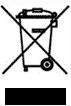
The WEEE symbol on your WatchGuard equipment indicates that it should not be disposed of by the end user with unsorted municipal waste, but in a manner consistent with required EU Directives, and the local transposition of the Directive in the end user's jurisdiction. The symbol is placed per CENELEC standard EN50419.
WEEE may contain hazardous substances which may negatively affect the environment and human health when disposed of through normal channels. Batteries that are not enclosed in the waste equipment must be separated from it and disposed of separately before being handed in at a collection point. Old batteries, and in certain cases also the waste equipment, can likewise be returned free of charge to the point of sale. You are responsible for deleting any personal data on the waste equipment. WatchGuard is committed to reduce the negative environmental and human health effects of WEEE which will help prevent potential negative consequences for the environment and human health. If you are a consumer please use your local recycling option. This is usually your municipal refuse site.
Japan VCCI Notice (Class A ITE)
これはVCCI評議会の基準に基づくクラスA製品です。本製品がラジオやテレビ受信機の近くで使用され
ている場合は、電波障害を引き起こすことがあります。インストールして、取扱説明書に従って
機器を使用しています VCCI-A
China Class A Notice
警告:未避免電磁干擾,本產品不應安裝或使用於住宅環境。
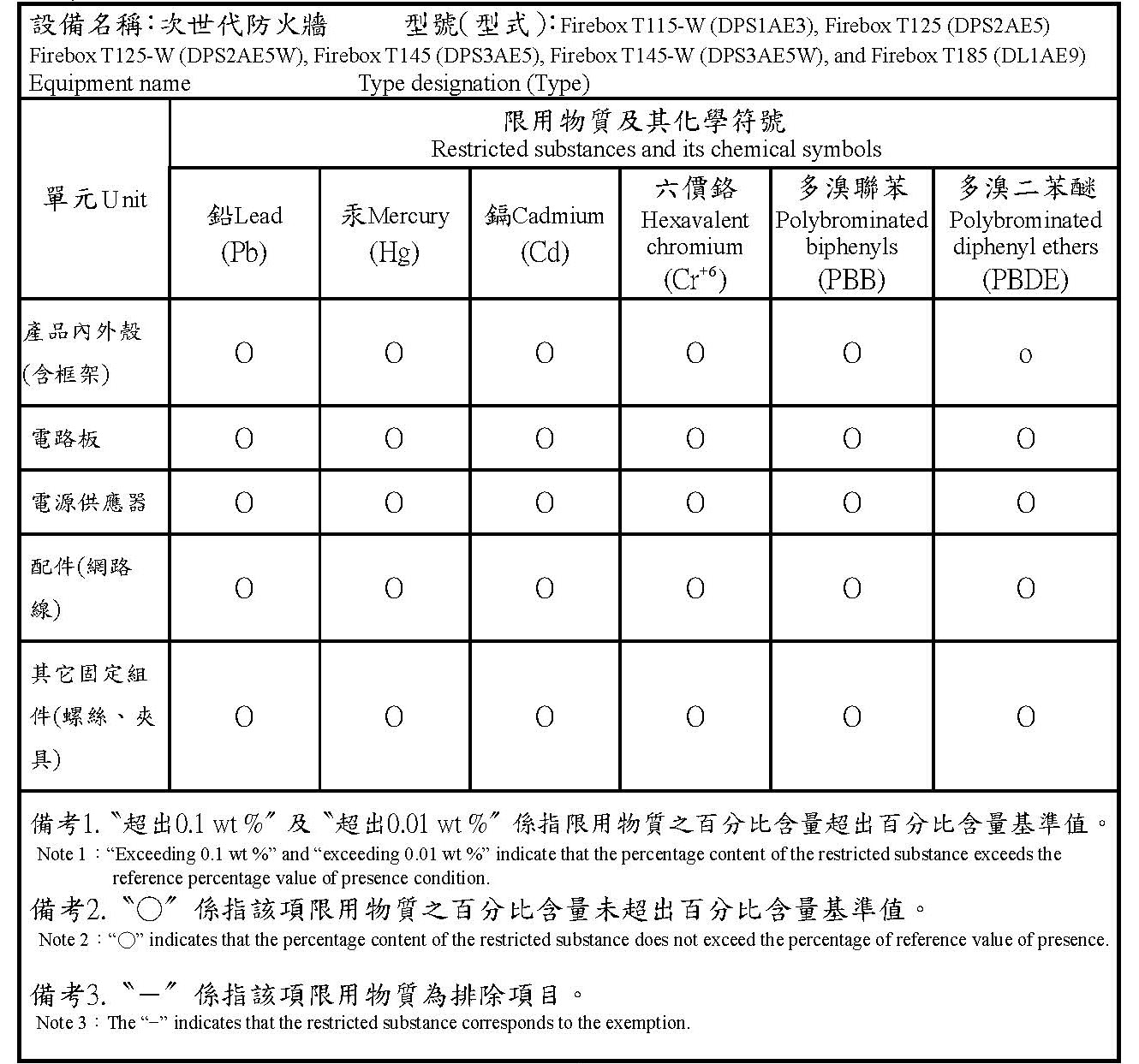
Taiwan RoHS
Taiwan Class A Notice
警告使用者:這是甲類產品,應使用並正確安裝。本產品可能會造成無線電干擾,在這種情況下,用
戶可能需要採取適當的措施。
警示 本電池如果更換不正確會有爆炸的危險,請勿自行更換電池
Taiwan NCC
低功率電波輻射性電機管理辦法
第十二條 經型式認證合格之低功率射頻電機 , 非經許可 , 公司﹑商號或使用者均不得擅自變更頻率﹑
加大功率或變更原設計之特性及功能。
第十四條 低功率射頻電機之使用不得影響飛航安全及干擾合法通信;經發現有干擾現象時 , 應立即停
用 , 並改善至無干擾時方得繼續使用。前項合法通信 , 指依電信法規定作業之無線電通信。 低功率射
頻電機須忍受合法通信或工業、科學及醫療用電波輻射性電機設備之干擾。
電磁波曝露量MPE標準值(MPE) 1mW/cm2,送測產品實值為0.338 mW/cm2
無線資訊傳輸設備避免影響附近雷達系統之操作
Taiwan BSMI CNS 15936 Type A Notice
警告:為避免電磁干擾,本產品不應安裝或使用於住宅環境。
Brazil ANATEL Notice
Este equipamento não tem direito à proteção contra interferência prejudicial e não pode causar interferência em sistemas devidamente autorizados.
Mexico NOM Notice
La operación de este equipo está sujeta a las siguientes dos condiciones:
(i) es posible que este equipo o dispositivo no cause interferencia perjudicial y
(ii) este equipo o dispositivo debe aceptar cualquier interferencia, incluyendo la que pueda causar su operación no deseada.
Limited Hardware Warranty
This Limited Hardware Warranty (the “Warranty”) applies to the enclosed hardware product, not including any associated software, which is licensed pursuant to a separate end-user license agreement and warranty (the “Product”). BY USING THE PRODUCT, YOU (either an individual or a single entity) AGREE TO THE TERMS HEREOF.
If you do not agree to these terms, please return this package, along with proof of purchase, to the authorized dealer from which you purchased it for a full refund. WatchGuard Technologies, Inc. (“WatchGuard”) and you agree as set forth below or on the reverse side of this card, as applicable.
- LIMITED WARRANTY. WatchGuard warrants that upon delivery and for one (1) year thereafter (the “Warranty Period”): (a) the Product will be free from material defects in materials and workmanship, and (b) the Product, when properly installed and used for its intended purpose and in its intended operating environment, will perform substantially in accordance with WatchGuard applicable specifications.
This warranty does not apply to any Product that has been: (i) altered, repaired or modified by any party other than WatchGuard except for the replacement or inclusion of specified components authorized in, and performed in strict accordance with, documentation provided by WatchGuard; or (ii) damaged or destroyed by force majeure events, accidents, power spikes or similar events or by any intentional, reckless or negligent acts or omissions of any party. You may have additional warranties with respect to the Product from the manufacturers of Product components. However, you agree not to look to WatchGuard for, and hereby release WatchGuard from any liability for, performance of, enforcement of, or damages or other relief on account of, any such warranties or any breach thereof.
- REMEDIES. If any Product does not comply with the WatchGuard warranties set forth in Section 1 above, WatchGuard will, following the receipt of the product you claim is defective and at its option, either (a) repair the Product, or (b) replace the Product with a like or similar product; provided, that you will be responsible for returning the Product and for all costs of shipping and handling. Repair or replacement of the Product shall not extend the Warranty Period. Any Product, component, part or other item replaced by WatchGuard becomes the property of WatchGuard. WatchGuard shall not be responsible for return of or damage to any software, firmware, information or data contained in, stored on, or integrated with any returned Products.
- DISCLAIMER AND RELEASE. THE WARRANTIES, OBLIGATIONS AND LIABILITIES OF WATCHGUARD, AND YOUR REMEDIES, SET FORTH IN PARAGRAPHS 1 AND 2 ABOVE ARE EXCLUSIVE AND IN SUBSTITUTION FOR, AND YOU HEREBY WAIVE, DISCLAIM AND RELEASE ANY AND ALL OTHER WARRANTIES, OBLIGATIONS AND LIABILITIES OF WATCHGUARD AND ALL OTHER RIGHTS, CLAIMS AND REMEDIES YOU MAY HAVE AGAINST WATCHGUARD, EXPRESS OR IMPLIED, ARISING BY LAW OR OTHERWISE, WITH RESPECT TO ANY NONCONFORMANCE OR DEFECT IN THE PRODUCT (INCLUDING, BUT NOT LIMITED TO, ANY IMPLIED WARRANTY OF MERCHANTABILITY OR FITNESS FOR A PARTICULAR PURPOSE, ANY IMPLIED WARRANTY ARISING FROM COURSE OF PERFORMANCE, COURSE OF DEALING, OR USAGE OF TRADE, ANY WARRANTY O NONINFRINGEMENT, ANY WARRANTY OF UNINTERRUPTED OR ERROR-FREE OPERATION, ANY OBLIGATION, LIABILITY, RIGHT, CLAIM OR REMEDY IN TORT, WHETHER OR NOT ARISING FROM THE NEGLIGENCE (WHETHER ACTIVE, PASSIVE OR IMPUTED) OR FAULT OF WATCHGUARD OR FROM PRODUCT LIABILITY, STRICT LIABILITY OR OTHER THEORY, AND ANY OBLIGATION, LIABILITY, RIGHT, CLAIM OR REMEDY FOR LOSS OR DAMAGE TO, OR CAUSED BY OR CONTRIBUTED TO BY, THE PRODUCT).
- LIMITATION AND LIABILITY. WATCHGUARD’S LIABILITY (WHETHER ARISING IN CONTRACT (INCLUDING WARRANTY), TORT (INCLUDING ACTIVE, PASSIVE OR IMPUTED NEGLIGENCE AND STRICT LIABILITY AND FAULT) OR OTHER THEORY) WITH REGARD TO ANY PRODUCT WILL IN NO EVENT EXCEED THE PURCHASE PRICE PAID BY YOU FOR SUCH PRODUCT. THIS SHALL BE TRUE EVEN IN THE EVENT OF THE FAILURE OF ANY AGREED REMEDY. IN NO EVENT WILL WATCHGUARD BE LIABLE TO YOU OR ANY THIRD PARTY (WHETHER ARISING IN CONTRACT (INCLUDING WARRANTY), TORT (INCLUDING ACTIVE, PASSIVE OR IMPUTED NEGLIGENCE AND STRICT LIABILITY AND FAULT) OR OTHER THEORY) FOR COST OF COVER OR FOR ANY INDIRECT, SPECIAL, INCIDENTAL, OR CONSEQUENTIAL DAMAGES (INCLUDING WITHOUT LIMITATION LOSS OF PROFITS, BUSINESS, OR DATA) ARISING OUT OF OR IN CONNECTION WITH THIS WARRANTY OR THE USE OF OR INABILITY TO USE THE PRODUCT, EVEN IF WATCHGUARD HAS BEEN ADVISED OF THE POSSIBILITY OF SUCH DAMAGES. THIS SHALL BE TRUE EVEN IN THE EVENT OF THE FAILURE OF ANY AGREED REMEDY.
- MISCELLANEOUS PROVISIONS. This Warranty will be governed by the laws of the state of Washington, U.S.A., without reference to its choice of law rules. The provisions of the 1980 United Nations Convention on Contracts for the International Sales of Goods, as amended, shall not apply. You agree not to directly or indirectly transfer the Product or use of the product or associated documentation to any country to which such transfer would be prohibited by the U.S. Export laws and regulations. If any provision of this Warranty is found to be invalid or unenforceable, then the remainder shall have full force and effect and the invalid provision shall be modified or partially enforced to the maximum extent permitted by law to effectuate the purpose of this Warranty. This is the entire agreement between WatchGuard and you relating to the Product, and supersedes any prior purchase order, communications, advertising or representations concerning the Product AND BY USING THE PRODUCT YOU AGREE TO THESE TERMS. IF THE PRODUCT IS BEING USED BY AN ENTITY, THE INDIVIDUAL INDICATING AGREEMENT TO THESE TERMS BY USING THE PRODUCT REPRESENTS AND WARRANTS THAT (A) SUCH INDIVIDUAL IS DULY AUTHORIZED TO ACCEPT THE WARRANTY ON BEHALF OF THE ENTITY AND TO BIND THE ENTITY TO THE TERMS OF THIS WARRANTY; (B) THE ENTITY HAS THE FULL POWER, CORPORATE OR OTHERWISE, TO ENTER INTO THE WARRANTY AND PERFORM ITS OBLIGATIONS UNDER THE WARRANTY AND; (C) THE WARRANTY AND THE PERFORMANCE OF THE ENTITY’S OBLIGATIONS UNDER THE WARRANTY DO NOT VIOLATE ANY THIRD-PARTY AGREEMENT TO WHICH THE ENTITY IS A PARTY.
No change or modification of the Warranty will be valid unless it is in writing and is signed by WatchGuard.