
Related Topics
About DNS Forwarding
You can configure your Firebox to forward DNS queries from computers on your network to a DNS server. For example, you can use DNS forwarding to send DNS queries from a branch office to a remote DNS server at headquarters.
In Fireware v11.12.2 and higher, you can enable DNS forwarding from Fireware Web UI, Policy Manager, and the CLI. You can also add conditional DNS forwarding rules. These rules allow you to send DNS queries to different DNS servers based on the domain name in the query.
Conditional DNS forwarding can result in faster response times to DNS queries. If you have resources in the cloud, your users can connect to those resources faster, because:
- Some cloud service providers use geolocation to select which datacenter you connect to. When you connect to a DNS server close to your location, your cloud provider can connect you to their closest datacenter.
- The Firebox caches the results from DNS queries.
In Fireware v11.12.1 and lower, you can only enable DNS forwarding from the command line, and conditional DNS forwarding is not supported. If you enabled DNS forwarding before you upgrade to Fireware v11.12.2, DNS forwarding remains enabled, but the functionality changes, as described in this topic.
For instructions to enable DNS forwarding in Fireware v11.12.1 or lower, see How to enable DNS forwarding in the WatchGuard Knowledge Base.
DNS Servers on Your Firebox
Your Firebox includes DNS servers for DNS forwarding. Each DNS server has a different purpose and is configured in a different location in the Firebox settings. The available DNS servers on your Firebox include:
Network DNS server
The default DNS server for all interfaces and local processes on the Firebox.
Configure this server in the DNS/WINS network settings:
- Fireware Web UI — Select Network > Interfaces > DNS/WINS tab
- Policy Manager — Select Network > Configuration > WINS/DNS tab
Interface DNS server
The DNS server for the interfaces that you specify.
This server takes precedence over the network DNS server, the conditional DNS server, and DNS forwarding.
Configure this server in the DHCP server settings for a specific interface:
- Fireware Web UI — Select Network > Interfaces > [Interface Name] > Edit > DNS/WINS tab
- Policy Manager — Select Network > Configuration > [Interface Name] > Configure > Use DHCP Server > Configure DNS/WINS Servers
Conditional DNS server
The DNS server for the domain names and interfaces that you specify in a DNS forwarding rule.
This server takes precedence over the network DNS server.
Configure this server in the DNS/WINS network settings:
- Fireware Web UI — Select Network > Interfaces > DNS/WINS > DNS Forwarding
- Policy Manager — Select Network > Configuration > WINS/DNS > Enable DNS Forwarding
How It Works
You can enable DNS forwarding, and conditional DNS forwarding, in these network modes:
- Mixed routing mode
- Drop-in mode
- Bridge mode
When you enable DNS forwarding:
- You must select one or more Trusted, Optional, or Custom interfaces to participate in DNS forwarding.
- The local processes on the Firebox use the Firebox as the DNS server.
- The Firebox caches the results of DNS queries (up to 10,000 entries).
- If you do not add conditional DNS forwarding rules, DNS queries sent to the local IP address of the Firebox are forwarded to the network DNS server that you specified. The Firebox caches the results of these queries.
- If you configure the Firebox to be a DHCP server, the DHCP clients on your network automatically use the IP address of the interface as the DNS server, unless you specify a DNS server in the DHCP server settings.
- DNS traffic sent from interfaces configured for DNS forwarding to the Firebox is allowed. The DNS policy and DNS proxy policy only apply to pass-through DNS traffic.
- If you configure a Firebox interface to be a DHCP server, and the interface is configured for DNS forwarding:
- If you do not specify a DNS server in the DHCP settings, the DHCP server automatically gives the IP address of the Firebox interface as the DNS server. DNS forwarding occurs.
- If you specify a DNS server other than the IP address of the Firebox interface in the DHCP settings, the DHCP server automatically gives the IP address of the DNS server you specified. DNS forwarding does not occur.
The Firebox can process up to 10,000 DNS requests at the same time.
If you enable logging for DNS forwarding, the Firebox to generates a log message when DNS forwarding occurs.
Conditional DNS Forwarding
In Fireware v11.12.2 and higher, you can add conditional DNS forwarding rules. When you add a forwarding rule, the Firebox uses cached information to respond to a DNS query, or it forwards the query to a DNS server specified in the rule.
For example, on the branch office Firebox that has a VPN connection to headquarters, you can configure DNS settings to:
- Forward DNS queries for the internal domain example.com through the VPN to the DNS server at headquarters.
- Forward all other DNS queries to a public DNS server that is physically closer to the branch office.
Configuration
When you enable conditional DNS forwarding on your Firebox, you can add DNS forwarding rules. For each DNS forwarding rule, you specify these settings:
Domain Name
Add one or more domain names. There is no limit to the number of domain names that you can specify. More specific domain names take precedence. The order of domain names does not matter.
DNS Server
Specify a DNS server. Queries for the domain name you added are sent to the DNS server you specify. You can add up to four DNS servers for each domain name. The Firebox contacts the first DNS server in the list, and contacts the other DNS servers as needed.
Example
In this example, a branch office has a Firebox configured as a DHCP server. An interface DNS server is not specified in the DHCP server settings. The internal DNS server is on the network at the headquarters office. On the Firebox at the branch office, a conditional DNS forwarding rule sends queries for example.com to the DNS server at headquarters. All other DNS queries are sent to the network DNS server specified on the Firebox.
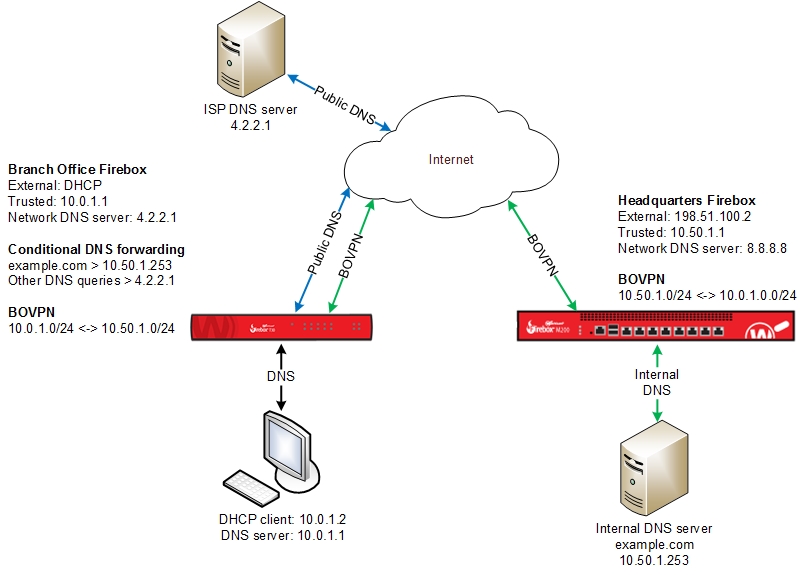
How it works:
- At the branch office, a DHCP client on the network sends a DNS query for the domain name example.com.
- The Firebox receives the query and examines its DNS cache.
- If the cache does not contain an entry for example.com, the Firebox examines its DNS Forwarding list.
- If example.com is included in the DNS Forwarding list, the Firebox forwards the query to the DNS server specified for that domain name.
In our example, the query is forwarded to the remote DNS server at headquarters, 10.50.1.253. - If example.com is not included in the DNS Forwarding list, the Firebox forwards the DNS query to the network DNS server, which is 4.2.2.1 in our example.
These images show the Network DNS and DNS forwarding settings for our example:

DNS forwarding settings in the Web UI

DNS forwarding settings in Policy Manager
See Also
Add WINS and DNS Server Addresses