場合によっては、WatchGuard Endpoint Security 製品を ConnectWise から直接デバイスにインストールするのが適切なこともあります。自動配備機能を使用するか製品のインストールをスケジュールするように WatchGuard プラグインを構成する場合、スケジュールされたインストールが実行されるまでに最長 12 時間かかることがあります。
デバイスに WatchGuard Endpoint Security 製品を手動でインストールするには、ConnectWise Automate Control Center から以下の手順を実行します:
- Clients タブを選択します。
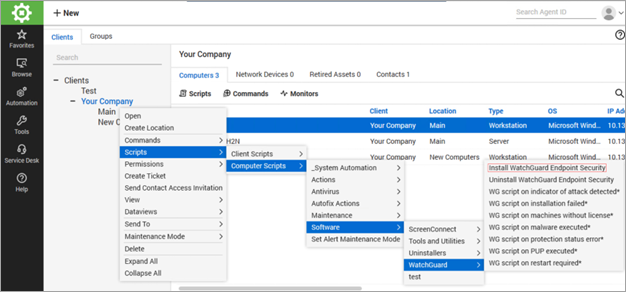
- クライアント、位置またはターゲット ホストを選択します。
- クライアントについては、クライアントを右クリックして、次の順に選択します:Client name > Scripts > Computer Scripts > Software > WatchGuard > Install WatchGuard Endpoint Security。
位置の場合は、Location name > Scripts > Computer Scripts > Software > WatchGuard > Install WatchGuard Endpoint Security の順に選択します。
ターゲット ホストの場合は、Host > Scripts > Software > WatchGuard > Install WatchGuard Endpoint Security の順に選択します。
ConnectWise Automate クライアントと WatchGuard Cloud アカウントのマッピング
ConnectWise Automate 用の WatchGuard Endpoint Security プラグインについて