Applies To: WatchGuard Cloud-managed Access Points (AP130, AP230W, AP330, AP332CR, AP340, AP430CR, AP432)
You can view the status of your access point SSIDs in WatchGuard Cloud.
To monitor the SSIDs of your access points:
- Select Monitor > Devices.
- Select an access point or a folder that contains your access points.
- Select Live Status > SSIDs.
The SSIDs page opens.
- To pause auto-refresh for the displayed data, click
 . To restart auto-refresh, click
  .
. - To select which columns appear in the table, click
 .
.
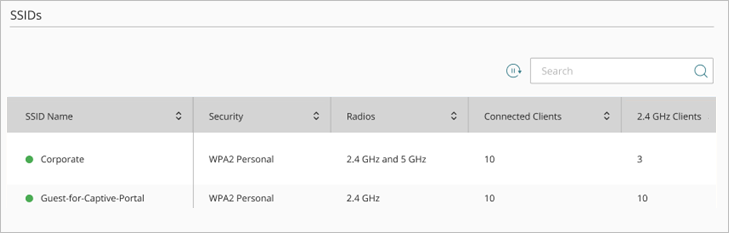
The SSIDs page for a specific access point includes this data:
- SSID Name — The name of the SSID.
- Access Point Name (Folder level) — The name of the access point that hosts the SSID.
- Security — The security mode of the SSID, such as WPA2 Personal.
- Radios — The radio bands that broadcast this SSID.
- Connected Clients — The number of clients currently connected to the SSID.
- 2.4 GHz Clients — The number of clients currently connected to the SSID on the 2.4 GHz radio band.
- 5 GHz Clients — The number of clients currently connected to the SSID on the 5 GHz radio band.
- 6 GHz Clients — The number of clients currently connected to the SSID on the 6 GHz radio band.
- Upload — Total client data forwarded from the SSID to the wired network.
- Download — Total amount of data transmitted from the network to clients connected to this SSID.
- BSSIDs — The Basic Service Set Identifiers (BSSIDs) associated with this SSID. Each BSSID represents a unique radio and band broadcasting the SSID.
Configure Access Point Network Interface Settings
Access Point Network Usage Report