Applies To: WatchGuard Cloud-managed Access Points (AP130, AP230W, AP330, AP332CR, AP340, AP430CR, AP432)
SNMP (Simple Network Management Protocol) is used to monitor devices on your network.
You can configure your access point to accept SNMP polls from an SNMP management system.
You can also send SNMP trap messages for access point events to an SNMP trap destination server. The trap identifies when a specific condition occurs, such as a value that is more than its predefined threshold. A trap is sent only once, and the trap destination does not send any acknowledgment when it receives the trap.
SNMP access point monitoring requires a WatchGuard USP Wi-Fi Management license.
SNMP MIB File for Access Points
SNMP uses management information bases (MIBs) to define what information and events to monitor. You can download and import the SNMP MIB file for the WatchGuard access point to your SNMP management system.
- To download the latest SNMP MIB file, go to SNMP MIB file for Wi-Fi in WatchGuard Cloud Access Points in the WatchGuard Knowledge Base.
- For more information on the contents of the MIB file, go to Access Point MIB File Summary.
The access point MIB file often changes during new device firmware releases. Make sure to download the latest MIB file.
SNMP Integration with RMM Tools
When you have configured SNMP on your access points, you will be able to integrate with remote management and monitoring (RMM) solutions to monitor your devices.
For detailed information on how to integrate WatchGuard access points with popular RMM solutions, go to Wi-FI Integration Guides.
Configure SNMP for Access Points in WatchGuard Cloud
To configure SNMP for an access point, from WatchGuard Cloud:
- Select Configure > Devices.
- Select a cloud-managed access point.
- Select Device Configuration.
- In the Settings tile, select Advanced Settings.
You can also configure advanced device settings such as SNMP in an Access Point Site and apply the configuration to multiple access points. For more information, go to About Access Point Sites.
- Enable SNMP.
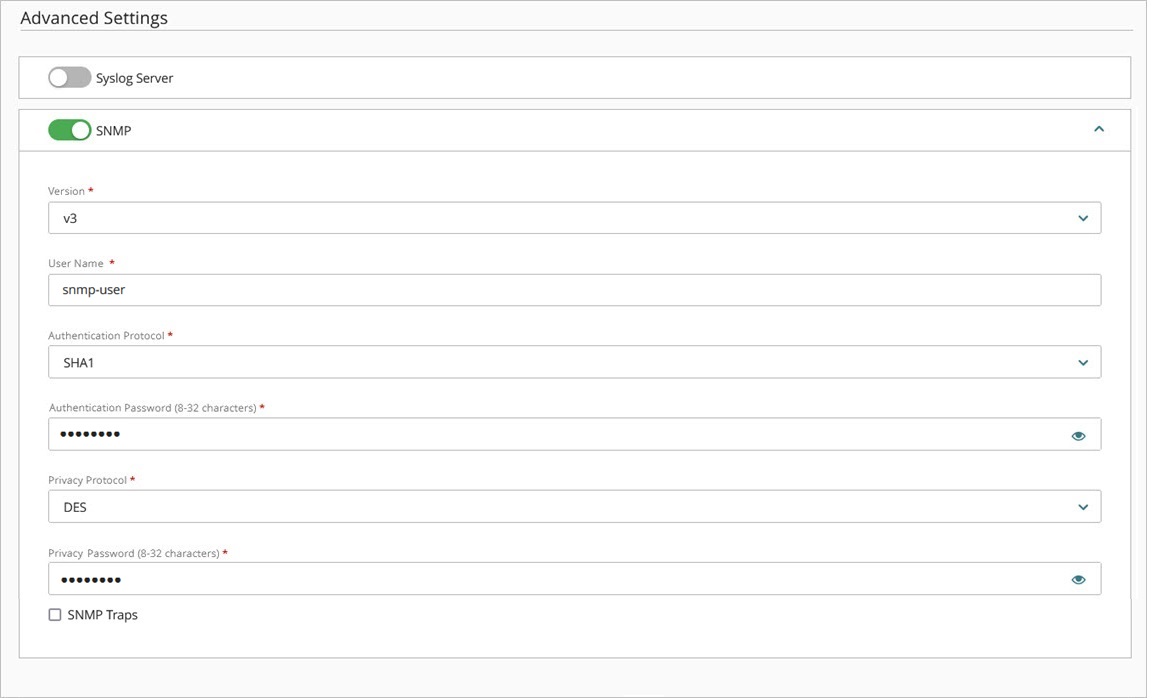
- From the Version drop-down list, select the SNMP version number.
- v1/v2c — SNMP v1 is the original version that provides low security because the community strings are communicated in plain text. SNMP v2c is similar to v1 with improvements to device management and network interface polling.
- v3 — SNMP v3 is the latest and most secure SNMP protocol version that enables you to use authentication and encryption to protect SNMP data.
Make sure your access point configuration matches the configuration on your SNMP management system.
- If you select SNMP v1/v2c, type the Read-Only Community String your device uses when it connects to the SNMP management system. This community string is transmitted in plain text and is not encrypted.
- If you select SNMP v3, configure these settings:
- User Name — Type a user name to authenticate with the SNMP management system.
- Authentication Protocol — Select the authentication protocol for communication to the SNMP management system (SHA1, MD5, or None). The default is SHA1.
- Authentication Password — If you enable the SHA1 or MD5 authentication protocol, type an authentication password. The password must be 8 to 32 characters in length.
- Privacy Protocol — SNMP v3 enables you to optionally encrypt messages for privacy. Select DES (Data Encryption Standard) to encrypt traffic or None to not encrypt SNMP traffic.
- Privacy Password — Type a password to encrypt outgoing messages and decrypt incoming messages. The password must be 8 to 32 characters in length.
- To send trap messages for access point events to an SNMP trap destination server, enable SNMP Traps.
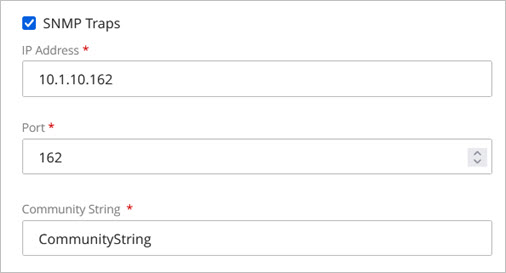
- Type the IP Address and Port number for the SNMP trap destination server. The default port is UDP 162.
- Type the Community String your device uses when it connects to the SNMP trap destination server.
- Click Save.
Access Point MIB File Summary
To get the latest MIB file, go to SNMP MIB file for Wi-Fi in WatchGuard Cloud Access Points in the WatchGuard Knowledge Base.
There are two versions of the SNMP MIB files depending on the firmware version installed on your access points:
- WATCHGUARD-PRIVATE-MIB-AP.mib — For access points with firmware v3.1 and higher.
- WatchGuard_Private_SNMP_Trap_v1.2 — For access points with firmware v2.7 and lower only.
The following sections describe the contents of each MIB file.

These tables provide a list and description of the objects included in the latest access point MIB file for access points with firmware versions v3.1 and higher.
System Information
| Object Name | Description | OID |
|---|---|---|
| Firmware Version | Firmware model name of the access point | 1.3.6.1.4.1.14125.9.1.1.1 |
| Serial Number | Device serial number | 1.3.6.1.4.1.14125.9.1.1.2 |
| Uptime | Device uptime | 1.3.6.1.4.1.14125.9.1.1.3 |
| Device Name | Name of the access point | 1.3.6.1.4.1.14125.9.1.1.4 |
| MAC Address | Primary wireless MAC address | 1.3.6.1.4.1.14125.9.1.1.5 |
| 2.4 GHz MAC Address | MAC address of the 2.4 GHz radio | 1.3.6.1.4.1.14125.9.1.1.6 |
| 5 GHz MAC Address | MAC address of the 5 GHz radio | 1.3.6.1.4.1.14125.9.1.1.7 |
| 6 GHz MAC Address | MAC address of the 6 GHz radio | 1.3.6.1.4.1.14125.9.1.1.8 |
| CPU Usage | Current CPU utilization | 1.3.6.1.4.1.14125.9.1.1.9 |
| Memory Usage | Current memory utilization | 1.3.6.1.4.1.14125.9.1.1.10 |
| Time Zone | Configured system time zone | 1.3.6.1.4.1.14125.9.1.1.11 |
SNMP Configuration
| Object Name | Description | OID |
|---|---|---|
| SNMP Enabled | Indicates whether SNMP is enabled | 1.3.6.1.4.1.14125.9.1.3.1 |
| Community String | Configured read-only SNMP community string | 1.3.6.1.4.1.14125.9.1.3.2 |
Network Configuration
| Object Name | Description | OID |
|---|---|---|
| IP Mode | IP addressing method (DHCP or static) | 1.3.6.1.4.1.14125.9.2.1.1 |
| IPv4 Address | Configured IPv4 address | 1.3.6.1.4.1.14125.9.2.1.2.1 |
| Subnet Mask | IPv4 subnet mask | 1.3.6.1.4.1.14125.9.2.1.2.2 |
| Default Gateway | IPv4 gateway address | 1.3.6.1.4.1.14125.9.2.1.2.3 |
| Primary DNS | Primary DNS server | 1.3.6.1.4.1.14125.9.2.1.2.4 |
| Secondary DNS | Secondary DNS server | 1.3.6.1.4.1.14125.9.2.1.2.5 |
| IPv6 Address | Configured IPv6 address | 1.3.6.1.4.1.14125.9.2.1.3.2 |
| IPv6 Prefix | IPv6 prefix | 1.3.6.1.4.1.14125.9.2.1.3.3 |
| IPv6 Gateway | IPv6 gateway address | 1.3.6.1.4.1.14125.9.2.1.3.4 |
| IPv6 Primary DNS | Primary DNS server (IPv6) | 1.3.6.1.4.1.14125.9.2.1.3.5 |
| IPv6 Secondary DNS | Secondary DNS server (IPv6) | 1.3.6.1.4.1.14125.9.2.1.3.6 |
Wireless Configuration
| Object Name | Description | OID |
|---|---|---|
| 2.4 GHz Radio Enabled | Indicates whether the 2.4 GHz radio is enabled | 1.3.6.1.4.1.14125.9.3.1.1.1 |
| 2.4 GHz Channel | Configured channel | 1.3.6.1.4.1.14125.9.3.1.1.5 |
| 2.4 GHz Transmit Power | Transmit power level | 1.3.6.1.4.1.14125.9.3.1.1.7 |
| 2.4 GHz Minimum Data Rate | Minimum supported data rate | 1.3.6.1.4.1.14125.9.3.1.1.9 |
| 5 GHz Radio Enabled | Indicates whether the 5 GHz radio is enabled | 1.3.6.1.4.1.14125.9.3.1.2.1 |
| 5 GHz Channel | Configured channel | 1.3.6.1.4.1.14125.9.3.1.2.5 |
| 5 GHz Transmit Power | Transmit power level | 1.3.6.1.4.1.14125.9.3.1.2.7 |
| 5 GHz Minimum Data Rate | Minimum supported data rate | 1.3.6.1.4.1.14125.9.3.1.2.9 |
| 6 GHz Radio Enabled | Indicates whether the 6 GHz radio is enabled | 1.3.6.1.4.1.14125.9.3.1.3.1 |
| 6 GHz Channel | Configured channel | 1.3.6.1.4.1.14125.9.3.1.3.6 |
| 6 GHz Transmit Power | Transmit power level | 1.3.6.1.4.1.14125.9.3.1.3.8 |
| 6 GHz Minimum Data Rate | Minimum supported data rate | 1.3.6.1.4.1.14125.9.3.1.3.10 |
SSID Configuration
| Object Name | Description | OID |
|---|---|---|
| SSID Enabled | Indicates whether the SSID is enabled | 1.3.6.1.4.1.14125.9.3.2.1.1.1 |
| SSID Bands | Radio bands assigned to the SSID | 1.3.6.1.4.1.14125.9.3.2.1.1.2 |
| SSID Name | Name of the wireless network | 1.3.6.1.4.1.14125.9.3.2.1.1.3 |
| Hidden SSID | Indicates whether SSID broadcast is disabled | 1.3.6.1.4.1.14125.9.3.2.1.1.4 |
| Client Isolation | Prevents communication between clients on the same SSID | 1.3.6.1.4.1.14125.9.3.2.1.1.5 |
| VLAN Isolation | Enables VLAN isolation | 1.3.6.1.4.1.14125.9.3.2.1.1.6 |
| VLAN ID | VLAN assigned to the SSID | 1.3.6.1.4.1.14125.9.3.2.1.1.7 |
Band Steering
| Object Name | Description | OID |
|---|---|---|
| Band Steering Enabled | Indicates whether band steering is enabled | 1.3.6.1.4.1.14125.9.3.2.2.1.1 |
| Steering Type | Band steering mode | 1.3.6.1.4.1.14125.9.3.2.2.1.2 |
| 5 GHz RSSI Threshold | Signal threshold used for steering decisions | 1.3.6.1.4.1.14125.9.3.2.2.1.3 |
Wireless Security
| Object Name | Description | OID |
|---|---|---|
| Encryption | Wireless encryption type | 1.3.6.1.4.1.14125.9.3.2.4.1.1 |
| Authentication Type | Authentication method | 1.3.6.1.4.1.14125.9.3.2.4.1.2 |
| Suite B 192-bit | Indicates whether Suite B encryption is enabled | 1.3.6.1.4.1.14125.9.3.2.4.1.4 |
| Protected Management Frames | 802.11w protection setting | 1.3.6.1.4.1.14125.9.3.2.4.1.5 |
| Key Interval | Key rotation interval | 1.3.6.1.4.1.14125.9.3.2.4.1.6 |
| Fast Roaming | Indicates whether fast roaming is enabled | 1.3.6.1.4.1.14125.9.3.2.4.1.14 |
RADIUS Configuration
| Object Name | Description | OID |
|---|---|---|
| RADIUS Server Type | Configured RADIUS server type | 1.3.6.1.4.1.14125.9.3.2.4.3.1.1 |
| Authentication Type | Authentication method for RADIUS | 1.3.6.1.4.1.14125.9.3.2.4.3.1.2 |
| RADIUS Server IP | Primary RADIUS server IP address | 1.3.6.1.4.1.14125.9.3.2.4.3.1.3 |
| RADIUS Server Port | Port used by the RADIUS server | 1.3.6.1.4.1.14125.9.3.2.4.3.1.4 |
| RADIUS Shared Secret | Shared secret for the RADIUS server | 1.3.6.1.4.1.14125.9.3.2.4.3.1.5 |
Traffic Shaping
| Object Name | Description | OID |
|---|---|---|
| Traffic Shaping Enabled | Indicates whether traffic shaping is enabled | 1.3.6.1.4.1.14125.9.3.2.3.1.1 |
| Download Limit | Maximum download bandwidth | 1.3.6.1.4.1.14125.9.3.2.3.1.2 |
| Upload Limit | Maximum upload bandwidth | 1.3.6.1.4.1.14125.9.3.2.3.1.3 |
| Per-Client Download Limit | Per-client download limit setting | 1.3.6.1.4.1.14125.9.3.2.3.1.4 |
| Per-Client Upload Limit | Per-client upload limit setting | 1.3.6.1.4.1.14125.9.3.2.3.1.5 |
Client Information
| Object Name | Description | OID |
|---|---|---|
| 2.4 GHz Client Count | Number of connected clients | 1.3.6.1.4.1.14125.9.3.3.1.1 |
| Client MAC Address | Client MAC address | 1.3.6.1.4.1.14125.9.3.3.1.3.1.1 |
| Client IP Address | Client IP address | 1.3.6.1.4.1.14125.9.3.3.1.3.1.2 |
| Client Hostname | Client hostname | 1.3.6.1.4.1.14125.9.3.3.1.3.1.3 |
| Client TX Bytes | Transmitted data | 1.3.6.1.4.1.14125.9.3.3.1.3.1.4 |
| Client RX Bytes | Received data | 1.3.6.1.4.1.14125.9.3.3.1.3.1.5 |
| Client OS | Client operating system | 1.3.6.1.4.1.14125.9.3.3.1.3.1.6 |
| Client RSSI | Signal strength | 1.3.6.1.4.1.14125.9.3.3.1.3.1.7 |
SNMP Traps
| Trap Name | Description | OID |
|---|---|---|
| CPU High Usage | CPU usage exceeds threshold | 1.3.6.1.4.1.14125.9.5.1 |
| Memory High Usage | Memory usage exceeds threshold | 1.3.6.1.4.1.14125.9.5.2 |
| NTP Connected | Device connected to NTP server | 1.3.6.1.4.1.14125.9.5.3 |
| NTP Failure | NTP server connection failed | 1.3.6.1.4.1.14125.9.5.4 |
| Radar Detected | Radar detected on DFS channel | 1.3.6.1.4.1.14125.9.5.5 |
| Country Change | Country configuration changed | 1.3.6.1.4.1.14125.9.6.1 |
| License Expiring | License will expire soon | 1.3.6.1.4.1.14125.9.6.2 |
| License Expired | License has expired | 1.3.6.1.4.1.14125.9.6.3 |
| Connected to Cloud | Connected to WatchGuard Cloud | 1.3.6.1.4.1.14125.9.6.6 |
| Disconnected from Cloud | Disconnected from WatchGuard Cloud | 1.3.6.1.4.1.14125.9.6.7 |
| Low Power Condition | Device is operating in low power mode | 1.3.6.1.4.1.14125.9.6.8 |
These tables provide a list and description of the objects included in an earlier version access point MIB file for access points with firmware versions v2.7 and lower.
WatchGuard_Private_SNMP_Trap_v1.2
| Object | Description | OID |
|---|---|---|
| status | Access point status | 1.3.6.1.4.1.14125.2.1 |
| system | Access point system status | 1.3.6.1.4.1.14125.2.1.1 |
| deviceName | The access point name | 1.3.6.1.4.1.14125.2.1.1.1 |
| sysPassword | The access point password | 1.3.6.1.4.1.14125.2.1.1.2 |
| firmwareVersion | The firmware version on the access point | 1.3.6.1.4.1.14125.2.1.1.5 |
| wirelessMacAddress | The access point MAC address | 1.3.6.1.4.1.14125.2.1.1.6 |
| upTime | The time since the last access point reboot | 1.3.6.1.4.1.14125.2.1.1.9 |
| serialNumber | The serial number of the access point | 1.3.6.1.4.1.14125.2.1.1.12 |
| status2point4G | Status of the 2.4 GHz radio | 1.3.6.1.4.1.14125.2.1.1.15 |
| ClientNumber | Number of connected clients on the 2.4 GHz radio | 1.3.6.1.4.1.14125.2.1.1.15.8 |
| clientList24G | List of clients on the 2.4 GHz radio | 1.3.6.1.4.1.14125.2.1.1.15.9 |
| liveClientTable | Table for clients associated to the access point | 1.3.6.1.4.1.14125.2.1.1.15.11 |
| liveClientTableEntry | Entries in the client settings table | 1.3.6.1.4.1.14125.2.1.1.15.11.1 |
| liveClientTableIndex | Index of the client settings table | 1.3.6.1.4.1.14125.2.1.1.15.11.1.1 |
| liveClientTableMacaddress | MAC address of the client | 1.3.6.1.4.1.14125.2.1.1.15.11.1.2 |
| liveClientTableIpaddress | IP address of the client | 1.3.6.1.4.1.14125.2.1.1.15.11.1.3 |
| liveClientTableHostname | Host name of the client | 1.3.6.1.4.1.14125.2.1.1.15.11.1.5 |
| liveClientTableActivityLevel | Activity level in bits per second | 1.3.6.1.4.1.14125.2.1.1.15.11.1.7 |
| liveClientTablePowerSaved | Indicates if power saving is enabled | 1.3.6.1.4.1.14125.2.1.1.15.11.1.8 |
| liveClientTableTxBytes | Amount of data sent in bytes | 1.3.6.1.4.1.14125.2.1.1.15.11.1.11 |
| liveClientTableRxBytes | Amount of data received in bytes | 1.3.6.1.4.1.14125.2.1.1.15.11.1.12 |
| liveClientTableOS | Operating system of the client | 1.3.6.1.4.1.14125.2.1.1.15.11.1.13 |
| liveClientTableRSSI | RSSI of the client | 1.3.6.1.4.1.14125.2.1.1.15.11.1.14 |
| status5G | Status of the 5 GHz radio | 1.3.6.1.4.1.14125.2.1.1.16 |
| ClientNumber5G | Number of connected clients on the 5 GHz radio | 1.3.6.1.4.1.14125.2.1.1.16.8 |
| clientList5G | List of clients on the 5 GHz radio | 1.3.6.1.4.1.14125.2.1.1.16.9 |
| liveClientTable5G | Table for clients associated to the access point | 1.3.6.1.4.1.14125.2.1.1.16.11 |
| liveClientTable5GEntry | Entries in the client settings table | 1.3.6.1.4.1.14125.2.1.1.16.11.1 |
| liveClientTable5GIndex | Index of the client table | 1.3.6.1.4.1.14125.2.1.1.16.11.1.1 |
| liveClientTable5GMacaddress | MAC address of the client | 1.3.6.1.4.1.14125.2.1.1.16.11.1.2 |
| liveClientTable5GIpaddress | IP address of the client | 1.3.6.1.4.1.14125.2.1.1.16.11.1.3 |
| liveClientTable5GHostname | Host name of the client | 1.3.6.1.4.1.14125.2.1.1.16.11.1.5 |
| liveClientTable5GActivityLevel | Activity level in bits per second | 1.3.6.1.4.1.14125.2.1.1.16.11.1.7 |
| liveClientTable5GPowerSaved | Indicates if power saving is enabled | 1.3.6.1.4.1.14125.2.1.1.16.11.1.8 |
| liveClientTable5GTxBytes | Amount of data sent in bytes | 1.3.6.1.4.1.14125.2.1.1.16.11.1.11 |
| liveClientTable5GRxBytes | Amount of data received in bytes | 1.3.6.1.4.1.14125.2.1.1.16.11.1.12 |
| liveClientTable5GOS | Operating system of the client | 1.3.6.1.4.1.14125.2.1.1.16.11.1.13 |
| liveClientTable5GRSSI | RSSI of the client | 1.3.6.1.4.1.14125.2.1.1.16.11.1.14 |
| cpuLoading | CPU load on the AP | 1.3.6.1.4.1.14125.2.1.1.18 |
| memUsage | Memory usage on the AP | 1.3.6.1.4.1.14125.2.1.1.19 |
| configuration | Access point configuration | 1.3.6.1.4.1.14125.2.2 |
| landhcp | LAN DHCP settings | 1.3.6.1.4.1.14125.2.2.5 |
| ipNetworkSettings | IP network settings | 1.3.6.1.4.1.14125.2.2.5.1 |
| lanIP | IP address of access point | 1.3.6.1.4.1.14125.2.2.5.2 |
| lanSubnetmask | Subnet mask | 1.3.6.1.4.1.14125.2.2.5.3 |
| lanGatewayIP | Gateway | 1.3.6.1.4.1.14125.2.2.5.4 |
| lanPrimaryDNSIP | Primary DNS server IP address | 1.3.6.1.4.1.14125.2.2.5.5 |
| lanSecondaryDNSIP | Secondary DNS server IP address | 1.3.6.1.4.1.14125.2.2.5.6 |
| ntp | NTP settings | 1.3.6.1.4.1.14125.2.2.6 |
| timeZone | Time zone of the access point | 1.3.6.1.4.1.14125.2.2.6.4 |
| twopointfourG | 2.4 GHz radio statistics | 1.3.6.1.4.1.14125.2.2.9 |
| wlan_twopointfourG | 2.4 GHz radio statistics | 1.3.6.1.4.1.14125.2.2.9.1 |
| wlanMode | Wireless LAN operation mode (802.11b/g/n) | 1.3.6.1.4.1.14125.2.2.9.1.1 |
| channelHTmode | WLAN narrow band | 1.3.6.1.4.1.14125.2.2.9.1.2 |
| wlanOpMode | WLAN operation mode | 1.3.6.1.4.1.14125.2.2.9.1.4 |
| wlanCountry | Country ID | 1.3.6.1.4.1.14125.2.2.9.1.6 |
| wlanChannel | The 2.4 GHz wireless channel 0 is auto channel |
1.3.6.1.4.1.14125.2.2.9.1.7 |
| wlanTxPower | Transmit power of the 2.4 GHz radio | 1.3.6.1.4.1.14125.2.2.9.1.12 |
| wlanChannelList | Channel list based on the region | 1.3.6.1.4.1.14125.2.2.9.1.20 |
| wlanTable | Table of 2.4 GHz SSID wireless network settings | 1.3.6.1.4.1.14125.2.2.9.1.21 |
| wlanEntry | Entries for 2.4 GHz SSID wireless network settings | 1.3.6.1.4.1.14125.2.2.9.1.21.1 |
| wlanEnable | Enable / disable 2.4 GHz radio | 1.3.6.1.4.1.14125.2.2.9.1.21.1.2 |
| wlanSSID | Wireless SSID | 1.3.6.1.4.1.14125.2.2.9.1.21.1.3 |
| wlanHideSSID | Enable / disable SSID broadcast | 1.3.6.1.4.1.14125.2.2.9.1.21.1.4 |
| wlanVLANID | Wireless interface VLAN ID | 1.3.6.1.4.1.14125.2.2.9.1.21.1.6 |
| wlanAuth | Wireless authentication type | 1.3.6.1.4.1.14125.2.2.9.1.21.1.7 |
| wlanWpapskPassphrase | Wireless WPA key | 1.3.6.1.4.1.14125.2.2.9.1.21.1.10 |
| wlanWpaRadiusSrvIP | RADIUS server IP address for WPA Enterprise authentication | 1.3.6.1.4.1.14125.2.2.9.1.21.1.11 |
| wlanWpaRadiusSrvPort | RADIUS server port for WPA Enterprise authentication | 1.3.6.1.4.1.14125.2.2.9.1.21.1.12 |
| wlanWpaRadiusSrvSecret | RADIUS server shared secret for WPA Enterprise authentication | 1.3.6.1.4.1.14125.2.2.9.1.21.1.13 |
| wlanWpaGroupKeyUpdateInterval | RADIUS server group key update interval for WPA Enterprise authentication | 1.3.6.1.4.1.14125.2.2.9.1.21.1.14 |
| wlanWpaRadiusAccEnable | Enable / disable VLAN | 1.3.6.1.4.1.14125.2.2.9.1.21.1.15 |
| wlanWpaRadiusAccSrvIP | RADIUS accounting server IP addresses for WPA Enterprise authentication | 1.3.6.1.4.1.14125.2.2.9.1.21.1.16 |
| WpaRadiusAccSrvPort | RADIUS accounting server port for WPA Enterprise authentication | 1.3.6.1.4.1.14125.2.2.9.1.21.1.17 |
| WpaRadiusAccSrvSecret | RADIUS accounting server shared secret for WPA Enterprise authentication | 1.3.6.1.4.1.14125.2.2.9.1.21.1.18 |
| wlanWpaInterimAccInterval | RADIUS accounting server interim accounting interval for WPA Enterprise authentication | 1.3.6.1.4.1.14125.2.2.9.1.21.1.19 |
| wlanIsolation | Enable / disable VLAN | 1.3.6.1.4.1.14125.2.2.9.1.21.1.20 |
| wlanTrafficShapingEnable | Enable / disable traffic shaping | 1.3.6.1.4.1.14125.2.2.9.1.21.1.22 |
| wlanTrafficShapingDownload | Traffic shaping download limit | 1.3.6.1.4.1.14125.2.2.9.1.21.1.23 |
| wlanTrafficShapingUpload | Traffic shaping upload limit | 1.3.6.1.4.1.14125.2.2.9.1.21.1.24 |
| wlanTrafficShapingDownloadPerUser | Traffic shaping download limit per user | 1.3.6.1.4.1.14125.2.2.9.1.21.1.28 |
| wlanTrafficShapingUploadPerUser | Traffic shaping upload limit per user | 1.3.6.1.4.1.14125.2.2.9.1.21.1.29 |
| wlanL2Isolation | Enable / disable layer 2 isolation | 1.3.6.1.4.1.14125.2.2.9.1.21.1.30 |
| wlanFastRoamingEnable | Enable / disable Fast Roaming | 1.3.6.1.4.1.14125.2.2.9.1.21.1.31 |
| wlanBandSteeringEnable | Enable / disable Band Steering | 1.3.6.1.4.1.14125.2.2.9.1.21.1.44 |
| wlanBandSteeringRssiThreshold | Set 5 GHz RSSI Threshold (-80 to 60 dBm) | 1.3.6.1.4.1.14125.2.2.9.1.21.1.45 |
| wlanBandSteeringPercentOfClient | Set percentage of clients on 5 GHz radio (0 to 100) | 1.3.6.1.4.1.14125.2.2.9.1.21.1.46 |
| fastRoaming_2point4G | Fast roaming for the 2.4 GHz radio | 1.3.6.1.4.1.14125.2.2.9.5 |
| fastRoamingEnable24G | Enable / Disable fast roaming | 1.3.6.1.4.1.14125.2.2.9.5.1 |
| fiveG | 5 GHz radio statistics | 1.3.6.1.4.1.14125.2.2.10 |
| wlan_5G | 5 GHz radio statistics | 1.3.6.1.4.1.14125.2.2.10.1 |
| wlanMode_5G | Wireless LAN operation mode (802.11a/n, 802.11ac) | 1.3.6.1.4.1.14125.2.2.10.1.1 |
| channelHTmode_5G | WLAN narrow band | 1.3.6.1.4.1.14125.2.2.10.1.2 |
| wlanOpMode_5G | WLAN operation mode | 1.3.6.1.4.1.14125.2.2.10.1.4 |
| wlanCountry_5G | Country ID | 1.3.6.1.4.1.14125.2.2.10.1.6 |
| wlanChannel_5G | The 5 GHz wireless channel 0 is auto channel |
1.3.6.1.4.1.14125.2.2.10.1.7 |
| wlanTxPower_5G | Transmit power of the 5 GHz radio | 1.3.6.1.4.1.14125.2.2.10.1.12 |
| wlanChannelList_5G | Channel list based on the country | 1.3.6.1.4.1.14125.2.2.10.1.20 |
| wlan5GTable | Table of 5 GHz SSID wireless network settings | 1.3.6.1.4.1.14125.2.2.10.1.21 |
| wlan5GEntry | Entries for 5 GHz SSID wireless network settings | 1.3.6.1.4.1.14125.2.2.10.1.21.1 |
| wlan5GEnable | Enable / disable 5 GHz radio | 1.3.6.1.4.1.14125.2.2.10.1.21.1.2 |
| wlan5GSSID | Wireless SSID | 1.3.6.1.4.1.14125.2.2.10.1.21.1.3 |
| wlan5GHideSSID | Enable / disable SSID broadcast | 1.3.6.1.4.1.14125.2.2.10.1.21.1.4 |
| wlan5GVLANID | Wireless interface VLAN ID | 1.3.6.1.4.1.14125.2.2.10.1.21.1.6 |
| wlan5GAuth | Wireless authentication type | 1.3.6.1.4.1.14125.2.2.10.1.21.1.7 |
| wlan5GWpapskPassphrase | Wireless WPA key | 1.3.6.1.4.1.14125.2.2.10.1.21.1.10 |
| wlan5GWpaRadiusSrvIP | RADIUS server IP address for WPA Enterprise authentication | 1.3.6.1.4.1.14125.2.2.10.1.21.1.11 |
| wlan5GWpaRadiusSrvPort | RADIUS server port for WPA Enterprise authentication | 1.3.6.1.4.1.14125.2.2.10.1.21.1.12 |
| wlan5GWpaRadiusSrvSecret | RADIUS server shared secret for WPA Enterprise authentication | 1.3.6.1.4.1.14125.2.2.10.1.21.1.13 |
| wlan5GWpaGroupKeyUpdateInterval | RADIUS server group key update interval for WPA Enterprise authentication | 1.3.6.1.4.1.14125.2.2.10.1.21.1.14 |
| wlan5GWpaRadiusAccEnable | Enable / disable VLAN | 1.3.6.1.4.1.14125.2.2.10.1.21.1.15 |
| wlan5GWpaRadiusAccSrvIP | RADIUS accounting server IP addresses for WPA Enterprise authentication | 1.3.6.1.4.1.14125.2.2.10.1.21.1.16 |
| Wpa5GRadiusAccSrvPort | RADIUS accounting server port for WPA Enterprise authentication | 1.3.6.1.4.1.14125.2.2.10.1.21.1.17 |
| Wpa5GRadiusAccSrvSecret | RADIUS accounting server shared secret for WPA Enterprise authentication | 1.3.6.1.4.1.14125.2.2.10.1.21.1.18 |
| wlan5GWpaInterimAccInterval | RADIUS accounting server interim accounting interval for WPA Enterprise authentication | 1.3.6.1.4.1.14125.2.2.10.1.21.1.19 |
| wlan5GIsolation | Enable / disable VLAN | 1.3.6.1.4.1.14125.2.2.10.1.21.1.20 |
| wlan5GTrafficShapingEnable | Enable / disable traffic shaping | 1.3.6.1.4.1.14125.2.2.10.1.21.1.22 |
| wlan5GTrafficShapingDownload | Traffic shaping download limit | 1.3.6.1.4.1.14125.2.2.10.1.21.1.23 |
| wlan5GTrafficShapingUpload | Traffic shaping upload limit | 1.3.6.1.4.1.14125.2.2.10.1.21.1.24 |
| wlan5GTrafficShapingDownloadPerUser | Traffic shaping download limit per user | 1.3.6.1.4.1.14125.2.2.10.1.21.1.28 |
| wlan5GTrafficShapingUploadPerUser | Traffic shaping upload limit per user | 1.3.6.1.4.1.14125.2.2.10.1.21.1.29 |
| wlan5GL2Isolation | Enable / disable layer 2 isolation | 1.3.6.1.4.1.14125.2.2.10.1.21.1.30 |
| wlan5GFastRoamingEnable | Enable / disable Fast Roaming | 1.3.6.1.4.1.14125.2.2.10.1.21.1.31 |
| wlan5GBandSteeringEnable | Enable / disable Band Steering | 1.3.6.1.4.1.14125.2.2.10.1.21.1.44 |
| wlan5GBandSteeringRssiThreshold | Set 5 GHz RSSI Threshold (-80 to 60 dBm) | 1.3.6.1.4.1.14125.2.2.10.1.21.1.45 |
| wlan5GBandSteeringPercentOfClient | Set percentage of clients on 5 GHz radio (0 to 100) | 1.3.6.1.4.1.14125.2.2.10.1.21.1.46 |
| fastRoaming5G | Fast roaming for the 5 GHz radio | 1.3.6.1.4.1.14125.2.2.10.5 |
| fastRoamingEnable5G | Enable / disable fast roaming | 1.3.6.1.4.1.14125.2.2.10.5.1 |
| stp | Spanning tree protocol settings (not supported for Wi-Fi 7 devices) |
1.3.6.1.4.1.14125.2.2.15 |
| stpMode | Enable / disable spanning tree (not supported for Wi-Fi 7 devices) |
1.3.6.1.4.1.14125.2.2.15.1 |
| stpPriority | Manageable component of the Port Identifier (not supported for Wi-Fi 7 devices) |
1.3.6.1.4.1.14125.2.2.15.5 |
| snmp | Simple Network Management Protocol | 1.3.6.1.4.1.14125.2.2.16 |
| snmpEnable | Enable / disable SNMP agent | 1.3.6.1.4.1.14125.2.2.16.1 |
| snmpCmntyRO | Read-only community string | 1.3.6.1.4.1.14125.2.2.16.2 |
| schedule | SSID schedule settings | 1.3.6.1.4.1.14125.2.2.18 |
| scheduleEnable | Enable / disable Wi-Fi schedule | 1.3.6.1.4.1.14125.2.2.18.1 |
| scheduleWirelessRadio | Select Wi-Fi radio schedule | 1.3.6.1.4.1.14125.2.2.18.2 |
| scheduleIndx | Select SSID schedule index |
1.3.6.1.4.1.14125.2.2.18.3 |
| scheduleSSID | Display schedule SSID name | 1.3.6.1.4.1.14125.2.2.18.4 |
| scheduleTemplates | Select schedule templates | 1.3.6.1.4.1.14125.2.2.18.5 |
| scheduleDay | Each day includes Status, StartHour, StartMinute, EndHour, EndMinute | 1.3.6.1.4.1.14125.2.2.18.6 |
| managementVLAN | Management VLAN settings | 1.3.6.1.4.1.14125.2.2.24 |
| managementVLANID | Set management VLAN ID | 1.3.6.1.4.1.14125.2.2.24.1 |
| clientControl | Advance client control settings | 1.3.6.1.4.1.14125.2.2.25 |
| bandSteering | Band steering settings | 1.3.6.1.4.1.14125.2.2.25.1 |
| bandsteeringEnable | Enable / disable band steering | 1.3.6.1.4.1.14125.2.2.25.1.1 |
| bandsteeringRssiThreshold | Set 5 GHz RSSI Threshold (-80 to 60 dBm) | 1.3.6.1.4.1.14125.2.2.25.1.2 |
| bandsteeringPercentOfClient | Set percentage of clients on 5 GHz radio (0 to 100) | 1.3.6.1.4.1.14125.2.2.25.1.3 |
| clientLimit | Client limit settings | 1.3.6.1.4.1.14125.2.2.25.2 |
| clientlimit2point4GEnable | Enable / disable client limits on 2.4 GHz radio | 1.3.6.1.4.1.14125.2.2.25.2.1 |
| maxClient2point4G | Maximum number of clients on 2.4 GHz radio | 1.3.6.1.4.1.14125.2.2.25.2.2 |
| clientlimit5GEnable | Enable / disable client limits on 5 GHz radio | 1.3.6.1.4.1.14125.2.2.25.2.3 |
| maxClient5G | Maximum number of clients on 5 GHz radio | 1.3.6.1.4.1.14125.2.2.25.2.4 |
| snmpPrivateTraps | Access point traps | 1.3.6.1.4.1.14125.2.3 |
| cpuNotify | High CPU usage (> 90%) is detected on the access point. | 1.3.6.1.4.1.14125.2.3.1 |
| memNotify | High memory usage (> 92%) is detected on the access point. | 1.3.6.1.4.1.14125.2.3.2 |
| ntpConnected | The access point is connected to the configured NTP server. | 1.3.6.1.4.1.14125.2.3.3 |
| nptFail | The access point cannot connect to the NTP server or the NTP server address is invalid. | 1.3.6.1.4.1.14125.2.3.4 |
| radarDetect | Radar is detected on the current DFS channel. The access point switches to another channel when radar is detected. | 1.3.6.1.4.1.14125.2.3.5 |
| snmpWGPrivateTraps | WatchGuard access point traps | 1.3.6.1.4.1.14125.2.4 |
| countryChange | The country of operation for the access point has changed. | 1.3.6.1.4.1.14125.2.4.1 |
| licenseIsExpiring | The access point license expires soon. This indicates that the device license expires within 7 days or fewer. | 1.3.6.1.4.1.14125.2.4.2 |
| licenseIsExpired | The access point license has expired. | 1.3.6.1.4.1.14125.2.4.3 |
| registeredToCloud | The access point is successfully registered to WatchGuard Cloud. | 1.3.6.1.4.1.14125.2.4.4 |
| unregisteredFromCloud | The access point is successfully unregistered from WatchGuard Cloud. | 1.3.6.1.4.1.14125.2.4.5 |
| connectedToCloud | The access point is connected to WatchGuard Cloud. | 1.3.6.1.4.1.14125.2.4.6 |
| disconnectedFromCloud | The access point is disconnected from WatchGuard Cloud. | 1.3.6.1.4.1.14125.2.4.7 |
WatchGuard Traps
This table includes a list of the SNMP traps generated by the access point and a description of each trap.
| Trap Name | Description | OID |
|---|---|---|
| cpuNotify | High CPU usage (> 90%) is detected on the access point. | 1.3.6.1.4.1.14125.2.3.1 |
| memNotify | High memory usage (> 92%) is detected on the access point. | 1.3.6.1.4.1.14125.2.3.2 |
| ntpConnected | The access point is connected to the configured NTP server. | 1.3.6.1.4.1.14125.2.3.3 |
| ntpFail | The access point cannot connect to the NTP server or the NTP server address is invalid. | 1.3.6.1.4.1.14125.2.3.4 |
| radarDetect | Radar is detected on the current DFS channel. The access point switches to another channel when radar is detected. | 1.3.6.1.4.1.14125.2.3.5 |
| countryChange | The country of operation for the access point has changed. | 1.3.6.1.4.1.14125.2.4.1 |
| licenseIsExpiring | The access point license expires soon. This indicates that the device license expires within 7 days or fewer. | 1.3.6.1.4.1.14125.2.4.2 |
| licenseIsExpired | The access point license has expired. | 1.3.6.1.4.1.14125.2.4.3 |
| registeredTo Cloud | The access point is successfully registered to WatchGuard Cloud. | 1.3.6.1.4.1.14125.2.4.4 |
| unregisteredFromCloud | The access point is successfully unregistered from WatchGuard Cloud. | 1.3.6.1.4.1.14125.2.4.5 |
| connectedToCloud | The access point is connected to WatchGuard Cloud. | 1.3.6.1.4.1.14125.2.4.6 |
| disconnectedFromCloud | The access point is disconnected from WatchGuard Cloud. | 1.3.6.1.4.1.14125.2.4.7 |
SNMPv2 Traps
| Object | Description | OID |
|---|---|---|
| coldStart | Access point is reinitializing with a new configuration. | 1.3.6.1.6.3.1.1.5.1 |
| warmStart | Access point is reinitializing and the configuration is unchanged. | 1.3.6.1.6.3.1.1.5.2 |
| linkDown | Access point network interface is down. | 1.3.6.1.6.3.1.1.5.3 |
| linkUp | Access point network interface is up. | 1.3.6.1.6.3.1.1.5.4 |
| authenticationFailure | SNMP authentication failure. Check the community string or password settings. | 1.3.6.1.6.3.1.1.5.5 |