Applies To: Endpoint Security Elite, Endpoint Security 360, Endpoint Security Prime, WatchGuard EDR, WatchGuard EDR Core, Endpoint Security Basic
In some cases, you might want to install WatchGuard Endpoint Security products immediately on a device directly from ConnectWise. If you configure the WatchGuard plug-in to use auto-deploy features or schedule the product installation, it might take up to 12 hours for the scheduled installation to run.
To manually install WatchGuard Endpoint Security products on a device, from ConnectWise Automate Control Center:
- Select the Clients tab.
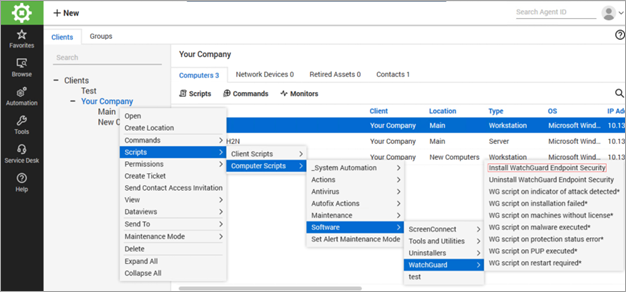
- Select your client, location, or target host.
- For a client, right-click the client, then select: Client name > Scripts > Computer Scripts > Software > WatchGuard > Install WatchGuard Endpoint Security.
For a location, select Location name > Scripts > Computer Scripts > Software > WatchGuard > Install WatchGuard Endpoint Security.
For a target host, select Host > Scripts > Software > WatchGuard > Install WatchGuard Endpoint Security.
Map ConnectWise Automate Clients and WatchGuard Cloud Accounts
About the WatchGuard Endpoint Security Plug-in for ConnectWise Automate