Applies To: Endpoint Security Elite, Endpoint Security 360, Endpoint Security Prime, WatchGuard EDR, WatchGuard EDR Core, Endpoint Security Basic
You can see the settings profiles assigned to a computer or device or a group of computers and devices from the Computers page.

- In WatchGuard Cloud, select Configure > Endpoint Security.
- Select Computers.

- From the left pane, select a group of computers or filter the list of computers.
You can enter the name of a computer or device in the Search bar. - In the computers list, select the computer you want to see settings profiles for.
The Computer Details page opens. - Select the Settings tab.
A list of the settings assigned to the computer display. You can see if each setting was directly assigned or inherited from a parent group.

- In WatchGuard Cloud, select Configure > Endpoint Security.
- Select Computers.
- From the left pane, select the My Organization tab.
- Select a group.
- Click the options
 menu, and select Settings.
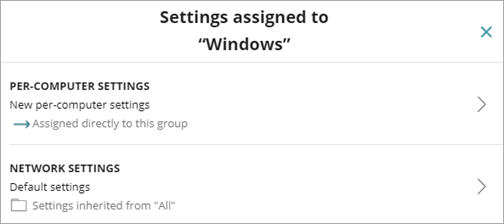
The Settings assigned to dialog box opens.
You can also open a settings profile to see the computers and devices assigned to the profile.
- In WatchGuard Cloud, select Configure > Endpoint Security.
- Select Settings.

- From the left pane, select the type of settings you want to view.
- Select a settings profile from the list.
The Edit Settings page opens.

- If the settings profile is assigned to one or more computers or groups, click View Computers. The list of assigned computers and devices appear. The list includes computers and devices assigned the settings profile individually or as part of a group.
The filter criteria for the list displays below the Search bar.

Manage Endpoint Groups in Endpoint Security