Applies To: Endpoint Security Elite, Endpoint Security 360, Endpoint Security Prime, WatchGuard EDR, WatchGuard EDR Core, Endpoint Security Basic
WatchGuard Endpoint Security solutions incorporate tools to locate unprotected workstations and servers, and initiate a remote unattended installation from the management UI. Remote installation is only compatible with Windows platforms.
To use discovery and remote installation, make sure these requirements are met:
- UDP port 21226 and 137 must be open in the firewall for the system process.
- TCP port 445 must be open in the firewall for the system process.
- NetBIOS over TCP/IP and DNS resolution must be enabled in the network.
- Administrative shares required in destination computers (Admin$).
- UAC remote restrictions must be disabled.
- Domain administrator (DOMAIN\administrator) or local built-in administrator (MACHINENAME\Administrator) credentials are required.
- Remote administration in the destination computer must be enabled. Go to Control Panel > System and Security > System > Remote settings and make sure the option to allow remote connections is enabled.
- Turn on network discovery and file and printer sharing. Go to Control Panel > Network and Internet > Network and Sharing Center > Change advanced sharing settings and select Turn on network discovery and Turn on file and printer sharing.
Other considerations:
- Only broadcast domain (subnet) machines will be discovered.
- Discovery through various VLANs might generate erroneous information because of the presence of intermediate routers. We recommend you have a discovery computer for each VLAN that uses this feature.
- Windows Home versions do not have administrative shares enabled by default.
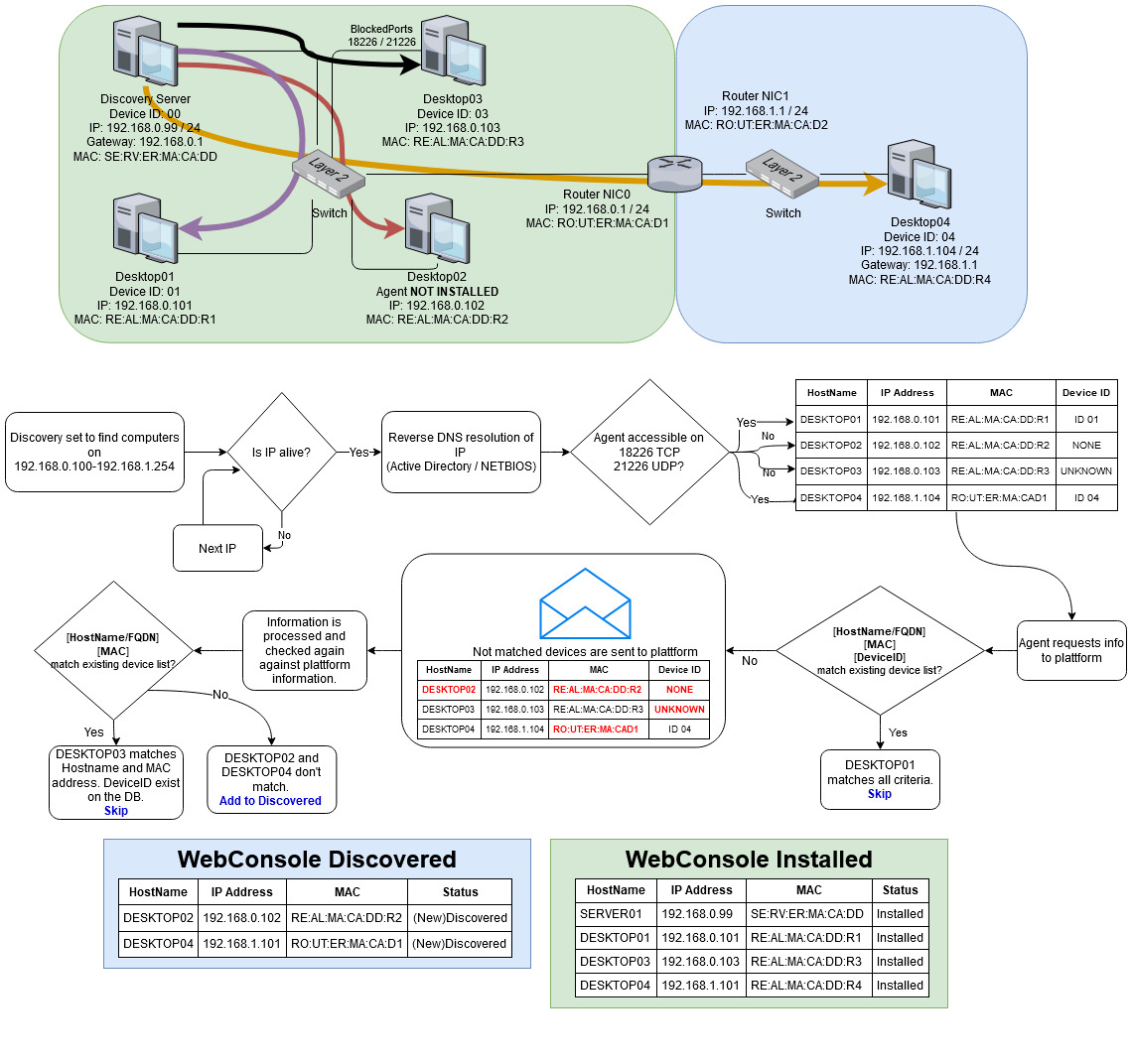
How Remote Discovery Works
This image shows how the discovery computer searches a network with subnets and evaluates whether to add a computer to the Undiscovered Computers list.