Applies To: Cloud-managed Fireboxes
A connection rate limit can help maintain service availability for services that become unstable or fail when too many connections occur at once. The connection rate limit restricts the number of new connections per second and prevents overload. You can configure this setting in the firewall policy that handles traffic for the service. When you configure a connection rate limit, the Firebox denies traffic for any additional connections and generates log messages.
You can also configure the policy to generate a notification when the connection rate exceeds the configured limit. For more information about how to configure notifications in a firewall policy, go to Configure Notifications in a Firewall Policy.
To configure a connection rate limit in a cloud-managed Firebox policy, from WatchGuard Cloud:
- Add or edit a policy. For more information, go to Configure Firewall Policies in WatchGuard Cloud.
- In the policy configuration, select the Advanced tab.
- Select the Set Connection Rate Limit check box.
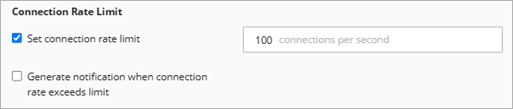
- In the text box, type the maximum number of connections per second. The default connection rate limit is 100 connections per second.
- (Optional) To receive a notification when the connection rate exceeds the limit, select Generate Notification When Connection Rate Exceeds Limit.
- To save the policy, click Save.
Configure Advanced Firewall Policy Settings for a Cloud-Managed Firebox