Applies To: Endpoint Security Elite, Endpoint Security 360, Endpoint Security Prime, WatchGuard EDR, WatchGuard EDR Core, Endpoint Security Basic
To open the multi-tenant management UI for endpoint security, your Service Provider account must have an active Endpoint Security product license in its inventory.
As a Service Provider, you can filter tenant accounts and update the protection version from the Clients' Product Versions list. The Clients' Product Versions list enables partners to see which version of the software that different client accounts have so they can resolve potential issues with a previous version with the new version.
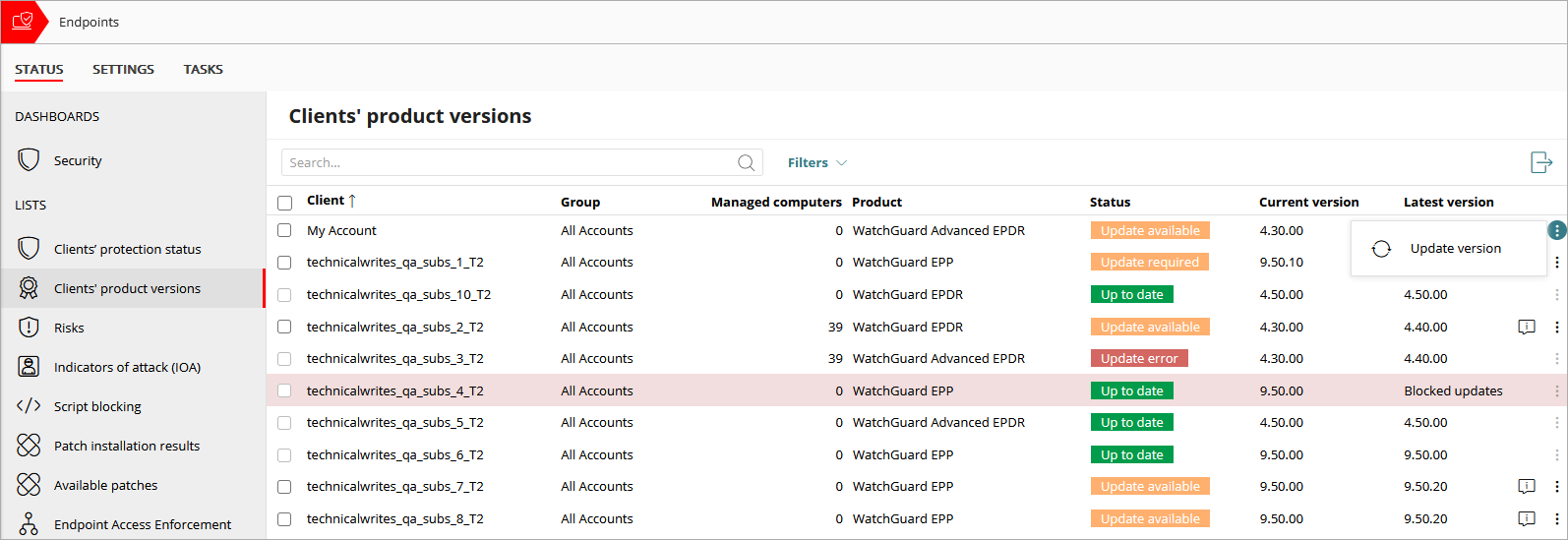
To filter the list of accounts, from WatchGuard Cloud:
- From Account Manager, select a Service Provider account.
To select your own Service Provider account, select Overview. Or, select a tier-n Service Provider account. - Select Monitor > Endpoint Security.
- Select Clients' Product Versions.
- Click Filters.

- From the Clients' Product Versions list, select the status you want to filter the list for.
For example, to show a list of all endpoints with an update available, select Update Available. - To refine the results, select options from these drop-down lists:
- Status — Select an option to filter the list for one or more statuses.
- Managed Computers — Select an option to filter the list by the number of computers managed.
- Product Management Mode — Select an option to filter the list for accounts that are centrally managed or not centrally managed. If an account is not centrally managed, it can assign settings locally.
- Client Update Blocking — Select an option to filter the list for accounts that have Blocked Updates or Unblocked Updates. When an account has blocked updates locally, the protection version cannot be updated from the list. The check box and the option to individually update the version are disabled and the row is red.
- Click Filter.
More information is available in the exported file. To export the list to a .CSV file, in the upper-right corner of the page, click  .
.
Clients' Product Versions List
The list includes detailed information about the status of the endpoint security protection software for each account group and includes filters to show fewer results.
The list includes this information:
Client
The name of the WatchGuard Cloud account.
Group
The name of the WatchGuard Cloud account group the account belongs to.
Managed Computers
The total number of computers and devices with an Endpoint Security product installed.
Product
The endpoint security product allocated to the account.
Status
The status of the protection version.
- Up to Date — The endpoint security product is updated to the latest version.
- Update Pending — The account is marked for upgrade, but the change process is not complete.
- Update Available — A new version of the protection software is available.
- Update Required — We recommend that the account be upgraded. The account will be automatically upgraded soon.
- Update Error — There was an error during the upgrade process.
Current Version
The protection version installed on endpoints in the account.
Latest Version
The most recent version of the protection software available for installation. If the client account has blocked updates locally, Blocked Updates shows in the column.
Update the Client Product Version
Partners can update the product version on their client accounts to take advantage of new features and resolve potential issues with a previous version with the new version.
To update the product version for accounts, from WatchGuard Cloud:
- From Account Manager, select a Service Provider account.
To select your own Service Provider account, select Overview. Or, select a tier-n Service Provider account. - Select Monitor > Endpoint Security.
- Select Clients' Product Versions.
- In the row for a managed account, click
 and select Update Version.
To update the protection version for multiple accounts, select the check boxes next to the account, and click Update Version above the list. - Click Update.
Troubleshoot Update Process Restarts
Restart Scenarios for Managed Endpoints