Applies To: Endpoint Security Elite, Endpoint Security 360, Endpoint Security Prime, WatchGuard EDR, WatchGuard EDR Core, Endpoint Security Basic
You must have Administrator permissions to install the WatchGuard Endpoint Security software on your computer or device. For more information, go to Installation Requirements (external link).
This topic includes instructions to install the endpoint software on these platforms:
Your operator role determines what you can see and do in WatchGuard Cloud. Your role must have the Add, Discover, and Delete Computers permission to view or configure this feature. For more information, go to Manage WatchGuard Cloud Operators and Roles.

To download and install the endpoint software on Windows computers:
-
Download the WatchGuard Agent Installer for Endpoint Security Products.
The Windows installer is compatible with computers with an x86 or ARM processor. - Double-click the icon and complete the steps in the wizard.
You see a progress bar during the installation process.
If there is no available license to assign to the target computer, administrators see a warning message in the management UI and the computer is added to WatchGuard Endpoint Security but is not protected.
When the installation completes, the WatchGuard Agent runs a series of checks:
- Agent Integration — Sends information from the computer to WatchGuard Cloud to enable integration into WatchGuard Cloud.
- Protection Module Installer Download — Downloads and installs the latest protection module.
- Signature File Download — Downloads the latest known malware signature file.
- Settings Download — Downloads the default and administrator-created settings to apply to the computer.
- Connectivity Check — If connectivity fails, reports the error type:
- Agent Installation Console: An error message shows the URLs that the agent could not connect to. To perform a new check, click Retry.
- Windows Event Viewer (Event log): An error message shows the URLs that the agent could not connect to.
- Web Console: An error message shows the URLs that the agent could not connect to.
To download and install the endpoint software on Mac computers:
- Download the WatchGuard Agent Installer for Endpoint Security Products.
- Double-click the .DMG file.
- Run the .PKG package.
- To make sure the agent is installed, and verify that the AgentSvc process is running, run this command:
- (Optional) Verify that the installer created these directories:
$ ps ax | grep AgentSvc
/Applications/Management-agent.app/Contents
/Library/Application Support/Management Agent/
To install the software on devices that run macOS Catalina, you must assign specific permissions. For more information, go to this Knowledge Base article (external) or Configure Permissions to Enable WatchGuard Endpoint Security in Mac Devices.
Before you begin, make sure you have administrator permissions on the device.
Install the Endpoint Security Software on Linux Computers with an Internet Connection
- Download the WatchGuard Agent Installer for Endpoint Security Products.
Make sure the downloaded package has execute permissions. The installer searches the target computer for the libraries it needs. If it cannot find the libraries, it downloads them automatically from the Internet. - Open a terminal in the folder where the downloaded package is located.
- Run this command:
$ sudo chmod +x “/<DownloadPath>/WatchGuard Agent.run”
$ sudo “/<DownloadPath>/WatchGuard Agent.run”
If you use a proxy server to access the Internet, add this parameter: --proxy. If you want to specify a list of proxy servers, use this parameter: --proxy-list=<proxy-list>.
The installation script uses the first proxy server in the list. If the server fails, the script continues down the list of proxy servers until it finds one that works. <proxy-list> is a list of proxy servers separated by commas. Users and protocols are indicated with this syntax:
<http|https>://<user1>:<pass1>@<host1>:<port1>
- To verify that the AgentSvc process is running, run this command:
- Make sure this installation directory was created:
$ ps ax | grep AgentSvc
/usr/local/management-agent/*
Install the Endpoint Security Software on Linux Computers with Secure Boot
Some Linux distributions detect when a computer has Secure Boot enabled. With Secure Boot enabled, endpoint security software that is not correctly signed will be disabled automatically. Secure Boot is detected when the software is installed, or later, if the distribution did not initially support this feature but it was added in a later update.
In either case, the management UI shows an error and the endpoint security software does not run. To solve the protection errors related to Secure Boot, make sure your system meets these requirements and complete these steps to resolve the errors:
System Requirements
- DKMS (Dynamic Kernel Module Support) systems: mokutil and openssl packages
- Oracle Linux 7.x/8.x/9.x with UEKR6 kernel: Repository ol7_optional_latest enabled, and openssl, keyutils, mokutil, pesign, kernel-uek-devel-$(uname -r) packages
Enable the Endpoint Security Software on Computers with Secure Boot
To enable the endpoint security software on the target computer:
- Check the state of secure boot:
$ mokutil --sb-state
If secure boot is enabled on the computer, Secure Boot enabled displays.
- Verify that the protection driver is not loaded:
$ lsmod | grep prot
- Import the protection keys:
$ sudo /usr/src/protection-agent-<version>/scripts/sb_import_key.sh
The agent and protection files have this format: protection-agent-03.01.00.0001-1.5.0_741_g8e14e52. The name varies according to the version and driver.
- If you use a proxy server to access the Internet, add this parameter: --proxy. If you want to specify a list of proxy servers, add this parameter: --proxy-list=<proxy-list> .
The installation script uses the first proxy server in the list. If the server fails, the script traverses the list of proxy servers until it finds one that works. <proxy-list> is a list of proxy servers separated by commas. Users and protocols are indicated with this syntax:
<http|https>://<user1>:<pass1>@<host1>:<port1>
- For distributions other than SUSE, upgrade the protection driver:
$ sudo /usr/local/management-agent/repositories/pa/install --install --kernel-only
- For SUSE, upgrade the protection driver:
$ sudo zypper up protection-agent-kmp-default
- Import the protection keys:
$ sudo /usr/src/protection-agent-<version>/scripts/sb_import_key.sh
The agent and protection files have this format: protection-agent-03.01.00.0001-1.5.0_741_g8e14e52.
The name varies according to the version and the driver. A message explains the implications of secure boot.
- To register the certificate used to sign the modules, press C.
- Enter an eight-character password.
- Restart the computer and complete the registration process:
- To start the registration process, press any key.
This screen appears for a limited time. If you do not press a key, you must restart the registration process. - Select Enroll MOK.
- To view the keys that are going to be registered, select View key.
- Confirm the keys belong to WatchGuard. Select Continue.
- To enroll the key, select Yes.
- Enter the password created in step 9.
- Select Reboot.
- Confirm the driver is loaded: $ lsmod | grep prot
- To start the registration process, press any key.
Oracle Linux 7.x/8.x/9.x with UEKR6 Kernel
When the distribution installed is Oracle Linux 7.x/8.x/9.x with UEKR6 kernel, after you complete the steps to register the certificate, run this command: $ sudo /usr/src/protection-agent-<version>/scripts/sb_import_key.sh.
This command adds the certificate used to sign the modules to the list of certificates trusted by the kernel. The modified kernel is signed and added to the list of kernels in GRUB.
- Restart the computer.
The module is loaded and started.
- To confirm that the certificate was added correctly, run this command:
$ sudo /usr/src/protection-agent-<version>/scripts/sb_import_key.sh
The results should be:
- The signer’s common name is UA-MOK Driver Signing
- Image /boot/vmlinuz-kernel-version-panda-secure-boot is already signed
- Kernel module is successfully loaded
Install the Endpoint Security Software on Linux Computers without an Internet Connection (without dependencies)
Workstations and servers without direct access to the Internet or access through a WatchGuard proxy and with out-of-date Linux distributions installed must use the full installation package. This package includes all the libraries required for the agent to work.
If you use the full package with an unsupported Linux distribution, the installation process will fail.
The full installer is compatible with these distributions:
Red Hat 6, 7, 8, and 9
CentOS 6, 7, 8.x
SUSE Linux Enterprise 11.2 to SUSE Linux Enterprise 15.2
The full installer is compatible with these Linux agent and protection versions:
Protection version — 3.01.00.001 and higher
Agent version — 1.10.06.0050 and higher
To install the software without an Internet connection:
- Open a terminal in the folder where the installer package is located.
- Run these commands:
$ sudo chmod +x "/<DownloadPath>/WatchGuard Agent.run"
$ sudo "/<DownloadPath>/WatchGuard Agent.run" -- --no-deps
- To verify that the AgentSvc process is running, run this command:
$ ps ax | grep AgentSvc
- Make sure this directory was created:
/usr/local/management-agent/*
You can install the Android app with or without a mobile device management (MDM) solution or enterprise mobility management (EMM) solution. Complete the appropriate procedure.
Install the WatchGuard Mobile Security App on Android Devices without an MDM or EMM Solution
To install the app on Android devices without an MDM or EMM solution:
- In WatchGuard Cloud, select Configure > Endpoint Security.
- Select Computers.
- Click Add Computers.
- Click the Android icon.
- From the Add Computers to this Group list, select the group to which you want to add the device.
- Use one of these methods to download the Android app to the device:
QR Code
Click the QR code to expand it. Open a QR code reader app on the Android device and scan the code. Tap the Google Play link to download and install the app.
QR Barcode Scanner and Barcode Scanner are free QR code readers available on Google Play.
Google Play
If you opened the management console from the Android device, tap the Google Play logo to install the app.
To send an email message with a link to download the Android app, click Send URL by Email and enter the email address you want to receive the link. To install the app from Google Play, tap the link in the email message.
After the app installs on the Android device, the user receives a prompt to enable administrator permissions to the app.
With different versions of Android (6.0 and later), permissions appear as required or as a single window when the app runs for the first time. When the process is complete, the device shows in the group selected in the folder tree in the management UI.
Install the WatchGuard Mobile Security App on Android Devices with an MDM or EMM Solution
To install the app on Android devices with an MDM or EMM solution:
- In WatchGuard Cloud, select Configure > Endpoint Security.
- Select Computers.
- Click Add Computers.
- Click the Android icon.
- Click Send URL by Email.
Your default email program opens with a predefined message that includes the download link. - Copy the download link to use for integration with your MDM or EMM solution.
-
In your MDM or EMM solution, import the WatchGuard Mobile Security app that you obtained from Play Store.
- In your MDM or EMM solution, enter the integration URL and specify the name to identify the device in the management UI.
- Use automatic name — WatchGuard Endpoint Security assigns a name to identify the device in the management UI when set to True. If the value of the parameter is True, a name based on the “<Device model>_<Unique identifier>” pattern is automatically assigned.
- Device name — The name that identifies the device in the management UI if the value of the Use automatic name parameter is False. Use wildcards and other special characters based on the specifications of the MDM or EMM solution you use.
If the Use automatic name parameter is set to False, and Device name is not defined, the device user specifies the device name the first time they open the app. When the user opens the app for the first time, they enter a name to identify the device on the Enter Alias screen. This is the name that identifies the device in the management UI. - Integration URL — The integration URL in the Endpoint Security management UI.
- Tap Continue.
A series of installation status messages appear and the user enables permissions to the app. If the user does not enable permissions to the app, the app does not work correctly. The installation process completes and the device appears in the management UI.
You can install the WatchGuard Mobile Security app with or without a mobile device management (MDM) solution. For more information, go to Mobile Device Management for iOS Devices.
Go to the appropriate section:
- Install the WatchGuard Mobile Security App on iOS Devices without an MDM Solution
- Install the WatchGuard Mobile Security App on iOS Devices Enrolled in the WatchGuard MDM Solution
- Install the WatchGuard Mobile Security App on iOS Devices Enrolled in a Third-Party MDM Solution
To use the URL filtering and anti-phishing capabilities provided by WatchGuard Endpoint Security, the iOS device must be in supervised mode. For more information, go to About Supervised Mode on iOS Devices.
Install the WatchGuard Mobile Security App on iOS Devices without an MDM Solution
To install the app on iOS devices without an MDM solution:
- In WatchGuard Cloud, select Configure > Endpoint Security.
- Select Computers.
- Click Add Computers.
- Click the iOS icon.
- Click Installation without an MDM Solution.
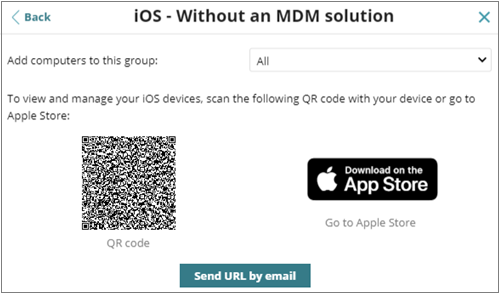
- From the Add Computers to this Group list, select the group to which you want to add the device.
- Use one of these methods to install the iOS app on the device:
QR Code
Click the QR code to expand it. Open a QR code reader app on the iOS device and scan the code. Tap the App Store link to install the app.
App Store
If you opened the management UI from the device, tap the App Store logo to install the app.
To send an email message with a link to install the app, click Send URL by Email. To install the app from the App Store, tap the link in the email message.
After the app installs, the user sees a prompt to enable administrator permissions to the app. When the process is complete, the device appears in the group selected in the folder tree in the management UI.
Install the WatchGuard Mobile Security App on iOS Devices Enrolled in the WatchGuard MDM Solution
The WatchGuard MDM solution requires use of the Apple Push Notification service. Before you begin, configure WatchGuard Endpoint Security to use the Apple Push Notification service. Complete the steps in Manage the Apple Push Certificate.
Caution: Make sure your iOS devices do not have a third-party MDM profile already installed. If they do, delete the profile from your devices before you enroll the devices in the WatchGuard MDM solution. When you delete the third-party profile, you lose centralized management capabilities provided by the MDM solution and cannot use any software you deployed through it.
After you upload the push certificate in the Endpoint Security management UI, you can deploy and install the WatchGuard Mobile Security app on iOS devices enrolled in the WatchGuard MDM solution.
For information on how to install the WatchGuard Mobile Security app on supervised iOS devices, go to Install the WatchGuard Mobile Security iOS App on Supervised Devices (WatchGuard MDM Solution).
To install the WatchGuard Mobile Security app on iOS devices enrolled in the WatchGuard MDM solution:
- In WatchGuard Cloud, select Configure > Endpoint Security.
- Select Computers.
- Click Add Computers.
- Click the iOS icon.
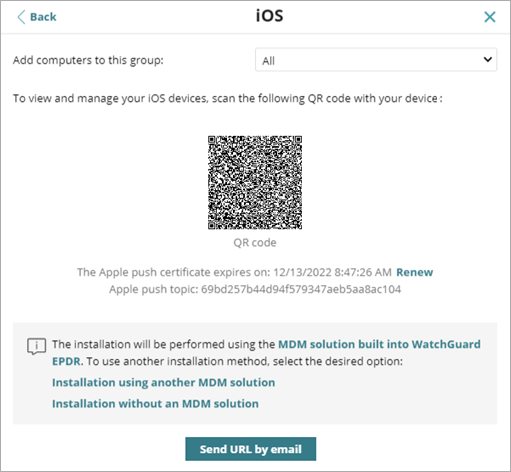
- From the Add Computers to this Group list, select the group to which you want to add the device.
- Use one of these methods to send the installation profile to the target iOS devices:
- On the device, tap Allow.
- Open Settings > General > VPN and Device Management.
The WatchGuard MDM Service profile appears. -
Tap WatchGuard MDM Service.
The Install Profile page opens with information about the security of the downloaded file. - In the upper-right corner, tap Install.
- Enter the device passcode.
-
In the upper-right corner, tap Install.
The Remote Management page opens. -
Tap Trust.
The profile installs. After a few minutes, the device shows a notification to automatically download and install the WatchGuard Agent. -
Tap Install.
The app downloads and installs on the device. - Open the app on the device for the first time.
The message WatchGuard Mobile Security Would Like to Send You Notifications appears. -
Tap Allow.
The device is added to the management UI and the Enter the iPhone Code page opens. - Enter the device passcode.
- Tap OK.
Installation is complete.
QR Code
To use a QR code to send the installation profile, scan the code with the device camera. The device shows the message, This website is trying to download a configuration profile. Do you want to allow this?.
To send an email message with the installation profile download link to the target user, click Send URL by Email. When the device user clicks the link, the device shows the message, This website is trying to download a configuration profile. Do you want to allow this?.
Install the WatchGuard Mobile Security App on iOS Devices Enrolled in a Third-Party MDM Solution
We recommend enrollment in a third-party MDM solution only if you already use an MDM solution. For information on the benefits of the WatchGuard MDM solution, go to Mobile Device Management for iOS Devices.
For information on how to install the WatchGuard Mobile Security app on supervised devices, go to Install the WatchGuard Mobile Security iOS App on Supervised Devices (Third-Party MDM Solution).
In this section, steps associated with the MDM software can vary based on the third-party vendor. For more information, review the product documentation for your MDM solution.
To install the WatchGuard Mobile Security app on iOS devices enrolled in a third-party MDM solution:
- In WatchGuard Cloud, select Configure > Endpoint Security.
- Select Computers.
- Click Add Computers.
- Click the iOS icon.
- Click Installation Using Another MDM Solution.
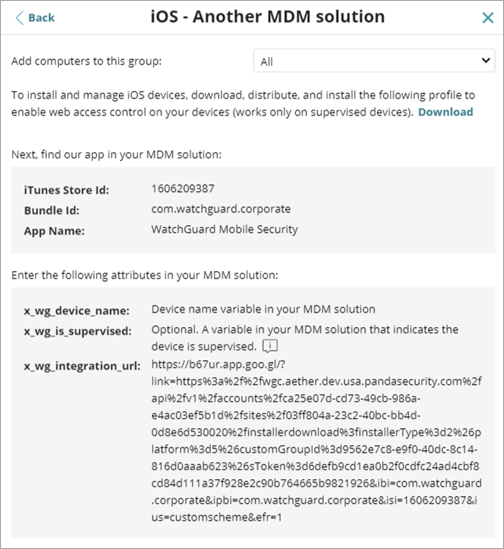
- From the Add Computers to this Group list, select the group to which you want to add the device.
- In the third-party MDM solution, import the WatchGuard Mobile Security app directly from the App Store. To do this, use the iTunes Store Id, Bundle Id, or App Name fields, or the search features included in the MDM solution.
- In the third-party MDM solution, define and associate the x_wg_device_name and x_wg_integration_url parameters from the
WatchGuard Mobile Security app with the corresponding parameters in the third-party solution.
The information contained in these parameters is sent when you push the WatchGuard Mobile Security app to the devices managed with the MDM solution. - x_wg_device_name — The device name that shows in the WatchGuard Endpoint Security management UI. In the x_wg_device_name parameter, enter the variable used by the MDM solution to represent the name of the device that will receive the WatchGuard Mobile Security app. If you do not use a variable, all mobile devices that receive the WatchGuard Mobile Security app show the same name in the management UI. Each MDM solution uses a different variable name and syntax. See your product documentation for more information
- x_wg_integration_url — The URL that points to the information that the app requires to integrate with the group selected by the administrator in the Endpoint Security management UI. Copy and paste the content of the x_wg_integration_url attribute shown in the management UI into the parameter defined in the MDM solution.
- Push the WatchGuard Mobile Security app from the MDM solution to the device you want to protect.
-
On the device, tap Install.
The app downloads and installs on the device. - Open the app on the device for the first time.
The message WatchGuard Mobile Security Would Like to Send You Notifications appears. -
Tap Allow.
The device is added to the management UI and the Enter the iPhone Code page opens. - Enter the device passcode.
- Tap OK.
Installation is complete.
Endpoint Security Supported Features by Platform
Installation Requirements (external link)
Download the WatchGuard Agent Installer for Endpoint Security Products
Install the Endpoint Software Remotely (Windows Computers)
Deploy Endpoint Security for macOS with Microsoft Intune Configurations