Applies To: AuthPoint Multi-Factor Authentication, AuthPoint Total Identity Security
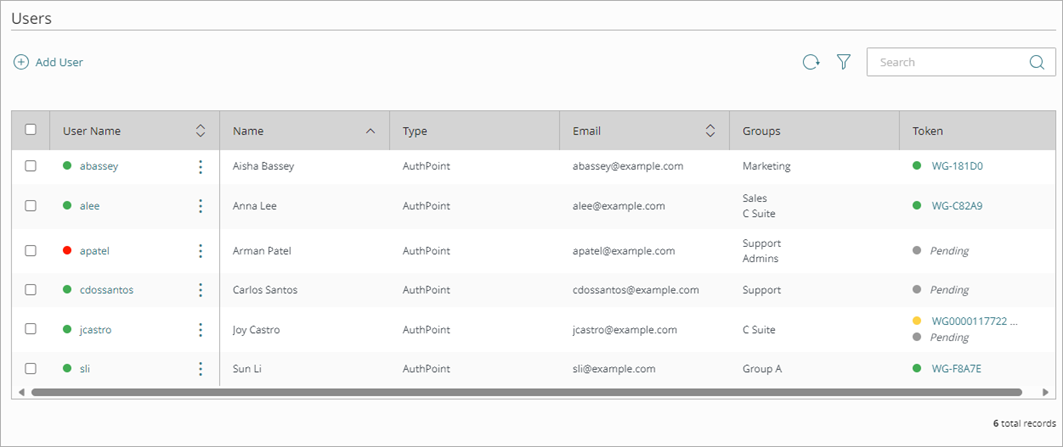
The Users page is where you manage AuthPoint user accounts. You can see your AuthPoint users and the details for each user account. These are the end-users who use AuthPoint for authentication.
From the Users page you can:
- Add and edit user accounts
- See and change the status of users and tokens
- Activate the Forgot Token feature for a user
- Filter the Users List
- Send the activation email again
- Send the set password email again
- Delete the password vault of a user
- Provision the password vault of a user
- Monitor Data Breaches for Your Credentials
User and Token Status
The User Name and Token columns show the status of the user account and that user's tokens. You can see if a user or token is active or blocked. In the Token column, you can click on a token to see information about that token and the device that it is activated on.

- Serial —The serial number of the token.
- Status — The status of the token (active or blocked).
- Associated to User — The AuthPoint user the token belongs to.
- Activated on — The date and time that the token was activated.
- Last Successful Authentication — The date and time of the most recent successful authentication with this token.
- Last Failed Authentication — The date and time of most recent failed authentication with this token.
- Authentication Attempts — The number of authentication attempts.
- Device Model — The model of the device this token is activated on.
- Device OS — The OS of the device this token is activated on.
- OS Version — The OS version of the device this token is activated on.
- AuthPoint App Version— The version of the AuthPoint mobile app that is installed on the device with this token.
- Manufacturer — The manufacturer of the device this token is activated on.
- Rooted / Jailbroken — Indicates whether the device this token is activated on is rooted or jailbroken.
- Emulator — Indicates whether the device this token is activated on is an emulator.
- Malicious Software Installed — Indicates whether the device this token is activated on has malicious software installed.
- Push Allowed — Indicates whether the user has allowed push notifications on the device this token is activated.
- Camera Allowed — Indicates whether the user has allowed camera permissions on the device this token is activated.
- Phone Protected with PIN or Pattern — Indicates whether the device this token is activated is protected with a PIN or Pattern.
For more information, go to Block a User or Token.
| User Status | Definition |
|---|---|
Activated |
The user account is activated and can authenticate with any active tokens |
Quarantined |
The LDAP synced user account cannot authenticate because the LDAP user was moved or deleted |
Blocked |
The user cannot authenticate with any WatchGuard tokens on any of their mobile devices |
Overallocated |
The user cannot authenticate because your AuthPoint account has more users than your license supports |
| Token Status | Definition |
|---|---|
| Activated |
The token is activated and can be used for authentication |
| Blocked |
The token is blocked and the user cannot authenticate with that token (they can still authenticate with other active tokens) |
| Pending |
The token has not been activated |
Data Breach Status
In the Last Reported Breach column, you can view the status of the reported credential breaches for your users. To view the data breach status, Dark Web Credential Monitoring must be enabled for a user. For more information on how to enable Dark Web Credential Monitoring, go to Monitor Data Breaches for Your Credentials.
The Last Reported Breach column can show these statuses:
- Breach Data and Location — Shows the date when the last credential breach was reported and the location of the credential breach. If the breached credentials originate from a sensitive source, the location of the breach shows the text Sensitive Breach. This protects users from potential harm if the source of the credential breach might reveal personal information, such as political affiliation, religion, or health status.
- No Breaches — No credential breach is reported for the user.
- Not Monitored — Dark Web Credential Monitoring is not enabled for the user.