Applies To: Locally-managed Fireboxes
When users connect to your Firebox with a web browser, they often see a security warning. This warning occurs because the default certificate is not trusted, or because the certificate does not match the IP address or domain name used for authentication. You can use a third-party or self-signed certificate that matches the IP address or domain name for user authentication. You must import that certificate on each client browser or device to prevent the security warnings.
If you use a certificate for authentication, it is important to track when the certificates expire. This helps to avoid disruptions in critical services such as VPN.
For more information about how to import and install a third-party Web Server certificate, go to Import and Install a Third-Party Web Server Certificate.
For information about how to configure a web server certificate for authentication of a cloud-managed Firebox, go to Configure the Web Server Certificate for Firebox Authentication in WatchGuard Cloud.

- In Fireware v12.2.1 or higher, select System > Certificates, and then select the Firebox Web Server Certificate tab.
In Fireware v12.2 or lower, select Authentication > Web Server Certificate.

- To use the default certificate, select Default certificate signed by Firebox and proceed to the last step in this procedure.
- To use a certificate you have previously imported, select Third party certificates.
- Select a certificate from the Third party certificates drop-down list and proceed to the last step in this procedure.
This certificate must be recognized as a web certificate. - To create a custom certificate signed by your Firebox, select Custom certificate signed by Firebox.
- Type the Common Name for your organization. This is usually your domain name.
- (Optional) You can also type an Organization Name and an Organization Unit Name to identify the part of your organization that created the certificate.
- To create additional subject names, or interface IP addresses for IP address on which the certificate is intended for use, in the Domain Names text box, type the domain name and click Add.
The domain name appears in the Domain Names list. - Repeat Step 8 to add more domain names.
- Click Save.
- In Fireware v12.2.1 or higher, select Setup > Certificates, and then select the Firebox Web Server Certificate tab.
In Fireware v12.2 or lower, select Setup > Authentication > Web Server Certificate.
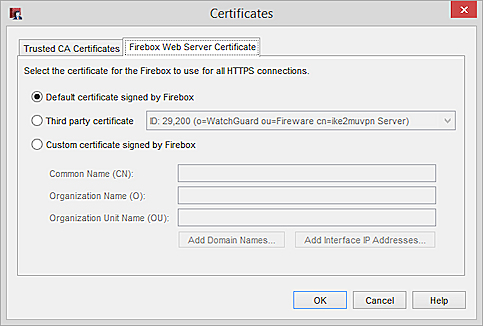
- To use the default certificate, select Default certificate signed by Firebox and proceed to the last step in this procedure.
- To use a certificate you have previously imported, select Third party certificate.
- Select a certificate from the Third party certificate drop-down list and proceed to the last step in this procedure.
This certificate must be recognized as a Web certificate. - To create a custom certificate signed by your Firebox, select Custom certificate signed by Firebox.
- Type the Common Name for your organization. This is usually your domain name.
- (Optional) You can also type an Organization Name and an Organization Unit Name to identify the part of your organization that created the certificate.
- Click Add Domain Names or Add Interface IP Addresses.
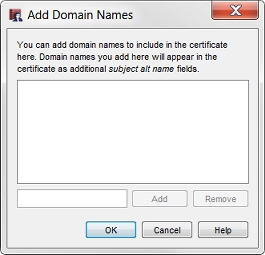
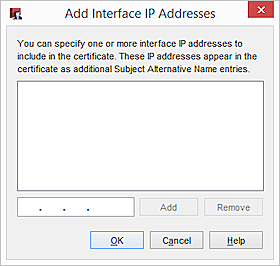
- In the text box at the lower part of the dialog box, type a domain name or IP address of an interface on your Firebox.
- Click Add.
- Repeat Steps 8–9 to add more domain names.
- Click OK.
To view the current web server certificate:
- Open Firebox System Manager.
- Select View > Certificates. The web server certificate is marked with an asterisk.
Manage Device Certificates (WSM)
Configure the Web Server Certificate for Firebox Authentication in WatchGuard Cloud