Applies To: WatchGuard SIEMFeeder
After you complete the WatchGuard Event Importer configuration wizard, you can start or stop Event Importer at any time.
When you start the Event Importer program, Event Importer begins the automatic import of event log files to the locations you specify in the configuration wizard.
In Command Line Mode (Windows)
To start Event Importer:
- Right-click the EventsFeederImporter.Multiplatform.Host.exe file and select Run as Administrator.
The Event Importer pane shows and reports the output of the command.
To stop Event Importer:
- From the Event Importer pane, press the keyboard shortcut Ctrl+C.
In Service Mode (Windows)
If configured to do so, the Event Importer service starts each time Microsoft Windows boots. To start the Event Importer service after a manual stop:
- In Windows, open Task Manager.
- Select the Services tab.
- Right-click the Event Importer service and select Start.
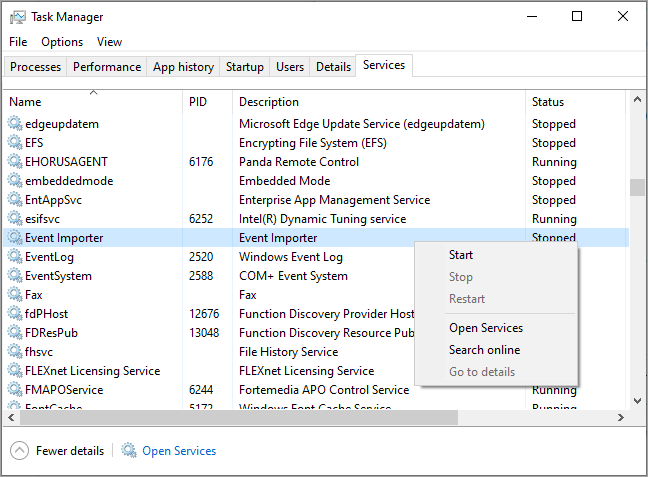
To stop the Event Importer service:
- In Windows, open Task Manager.
- Select the Services tab.
- Right-click the Event Importer service and select Stop.
In Command Line Mode (Linux)
To start Event Importer:
- At the command prompt, type:
./EventsFeederImporter.Multiplatform.Host
The Event Importer pane shows and reports the output of the command.
To stop Event Importer:
- From the command line, press the keyboard shortcut
Ctrl+C.
In Daemon Mode (Linux)
You can use a Linux distribution terminal window to start, stop, or get the status of Event Importer:
- To start Event Importer, from the command line, type the command:
sudo service siemfeeder start - To stop Event Importer, from the command line, type the command:
sudo siemfeeder stop - To get the status of Event Importer, from the command line, type the command:
sudo systemctl status siemfeeder.service
Configure and Run Event Importer for Microsoft Windows