Applies To: Endpoint Security Elite, Endpoint Security 360, Endpoint Security Prime, Endpoint Security Basic
When anti-theft is enabled, you can take a photo of the person using the Android device. The feature is not available if the device has privacy mode enabled. For information on anti-theft and privacy mode, go to Configure Anti-Theft Settings for Android Devices.
Note: Snap the Thief is not available on iOS devices.
Your operator role determines what you can see and do in WatchGuard Cloud. Your role must have the Use Anti-Theft Protection for Mobile Devices permission to view or configure this feature. For more information, go to Manage WatchGuard Cloud Operators and Roles.
To take a photo of the person holding an Android device:
- In WatchGuard Cloud, select Configure > Endpoint Security.
- Select Computers.
- From the left pane, select
 My Organization.
- Select the Android group.
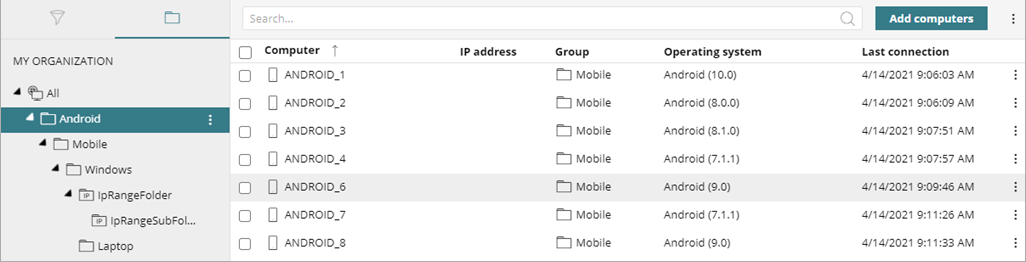
- From the list of devices, select the device you want to take a photo from.
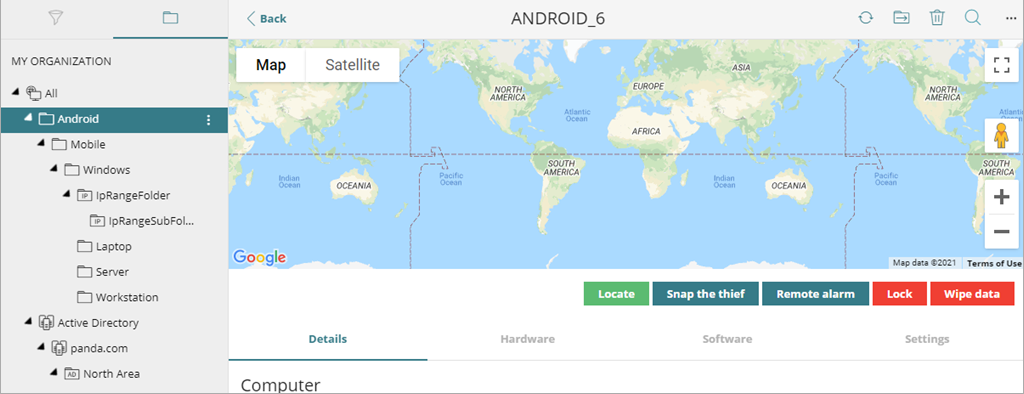
- Below the map, click Snap the Thief.
The Snap the Thief dialog box opens.

- In the text box, enter an email address to send a photo of the potential thief to.
- Specify when you want the photo to be taken:
- Now— Endpoint Security immediately takes a photo from the device and sends it to the specified address.
- When the Screen is Touched — Endpoint Security takes a photo and sends it to the specified address when the user or potential thief touches the device screen.